Find a trending sound on TikTok
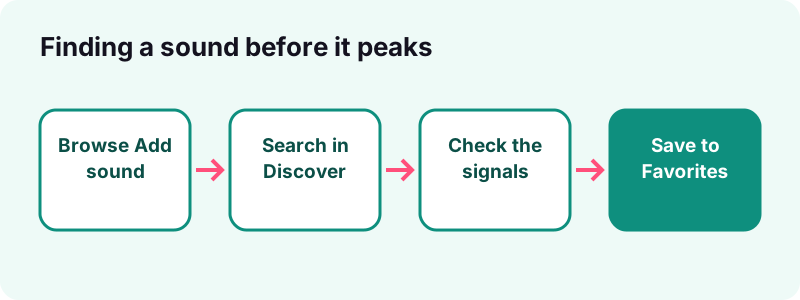
- Open Add sound. Tap the Add post + button, then Add sound at the top of the recording screen.
- Browse For You. Preview the sounds on the For You tab; TikTok picks them for your account.
- Search and filter. Use Search for a song or mood, and on the main search screen use Filters to narrow the results.
- Check the signals. Open the sound and look at how many recent posts use it and how varied they are.
- Save it. Tap the Favorites button so the sound waits for you in the Favorites tab.
What are trending sounds on TikTok?
Trending sounds are audio clips, songs or original recordings, that a fast-growing number of TikTok posts reuse at the same time. Each sound has its own page that collects the posts made with it, so a trend becomes visible as soon as people start copying it.
Sound has been central to the app from the start. Wikipedia notes that users can choose background music from many genres and add their own sound on top. A trend can be a chart song, a movie quote, a voice line from a creator or a sped-up remix.
Why do sounds matter so much on TikTok?
Because a sound links your post to every other post that uses it. Viewers who tap the sound see a stream of videos built on the same audio, which gives each one an extra way to be found beyond hashtags and the For You feed.
Can a TikTok sound really change the charts?
Yes, and the record is well documented. Several songs reached the charts, or came back to them decades later, because a TikTok sound spread first. These cases explain why creators and labels watch trending sounds so closely.
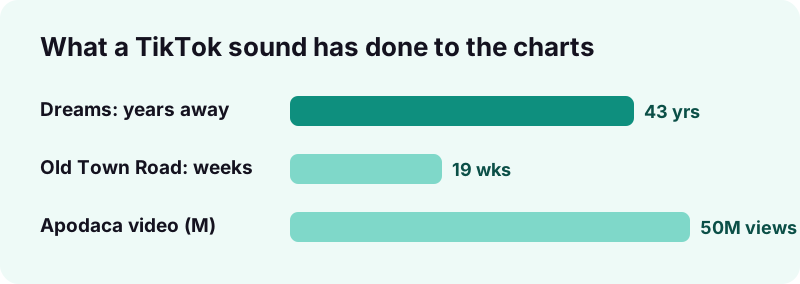
- Old Town Road took off in late December 2018 through the "Yeehaw Challenge" on TikTok, entered the Billboard Hot 100 at number 83 and then held number one for a record nineteen weeks.
- Dreams by Fleetwood Mac returned in 2020 after Nathan Apodaca's skateboarding video, which passed 50 million views. Wikipedia's TikTok article says it re-entered the Billboard Hot 100 after 43 years.
- Wikipedia also notes that the platform has turned many songs that failed at first into sleeper hits.
Why does this matter for ordinary creators?
You will not create the next Old Town Road by accident, but the pattern is the same at small scale: a sound grows because people reuse it, and early posts ride that growth. Wikipedia's Old Town Road article tells the full story.
Where does TikTok show trending sounds?
There are four places inside the app worth checking: the Add sound library, Discover, search, and the sound page of any post you like. Each shows a different slice, so using them together gives the clearest picture.
| Place | How to open it | What it shows best |
|---|---|---|
| Add sound library | Add post + › Add sound | Sounds picked for you, plus Favorites and Recent |
| Discover | Discover tab at the bottom | Trending videos, hashtags and creators |
| Search | Search button › type › Sounds results | Sounds matching a song, mood or keyword |
| Sound page | Tap the sound on a post | Every post made with that one sound |
| Creative Center | Separate TikTok site for advertisers | Trend pages for advertisers (no link here; see below) |
Which place should you check first?
None of these places is "the" official chart of trending sounds. TikTok personalises what you see, so two people opening the same tab will rarely get the same list.
How do you find trending sounds in the Add sound library?
Tap the Add post + button, then Add sound at the top of the recording screen. The For You tab lists sounds TikTok suggests for your account, which usually leans on what is popular among people with similar interests.
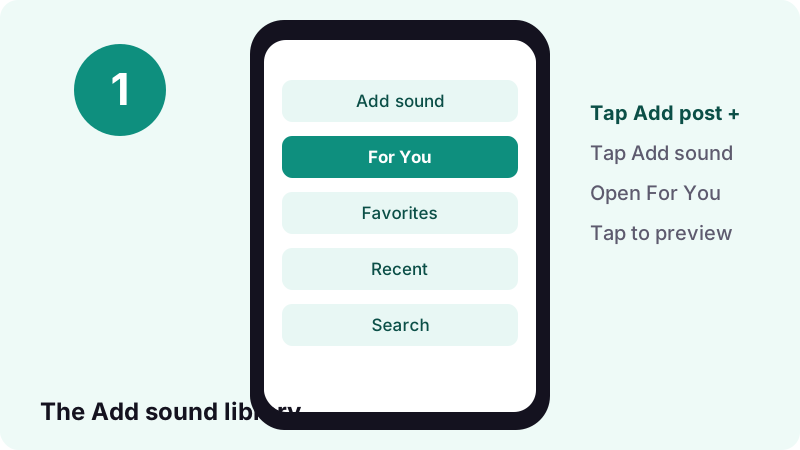
- In the TikTok app, tap Add post + at the bottom.
- Tap Add sound at the top of the recording screen.
- Tap any sound to hear a preview.
- Switch between the For You, Favorites and Recent tabs.
- Tap Search to look up a specific song or mood.
What should you listen for?
Treat For You as a starting list, not a verdict. Preview ten or so sounds, note the ones you keep hearing in your feed, and check those against the signals described later in this guide.
How do you use Discover and search to spot trending sounds?
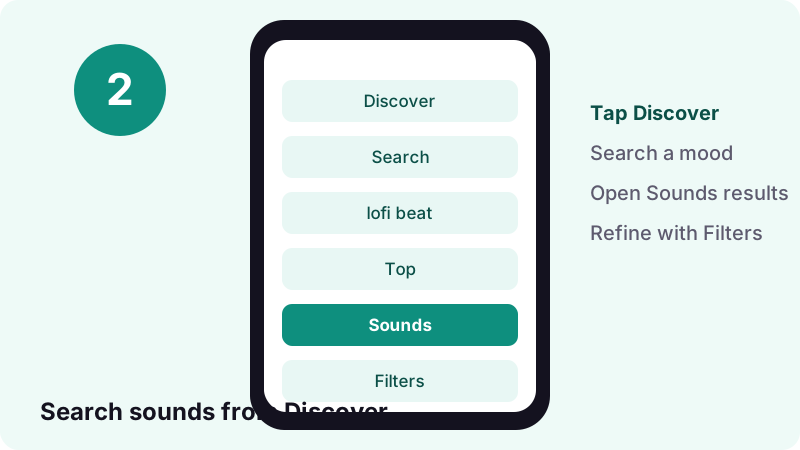
Open Discover from the bottom of the app and browse what is trending, or tap Search, type a song, artist or mood, and look at the sound results. TikTok describes Discover as the place for trending content.
“Discover allows you to search and explore the wide variety of content in the TikTok community, including trending videos, hashtags, creators, and sponsored content.”
How do you narrow search results?
After a search, tap the More options button at the top, then Filters, choose what you want and tap Apply. TikTok says the most relevant results appear in the Top tab, so check the other result tabs too before you decide.
What if you see Friends instead of Discover?
TikTok notes that some people see a Friends tab in place of Discover, and that Discover is not available everywhere. Search still works from the Search button at the top of the screen.
Is there a "trending" arrow or label on TikTok sounds?
Some guides describe an up-arrow or a "popular" style label next to sounds in the library. We could not find any such badge documented in the TikTok Help Center, and app labels change between versions, so do not rely on one.
If your app shows a marker like this, treat it as a hint, then confirm with what you can check yourself: how recent the posts on the sound page are, how many different creators use the sound, and whether it is turning up in your own feed.
Why not trust a single badge?
- It may describe your region or interests only, not the whole app.
- It cannot tell you whether a sound is still rising or already peaked.
- A badge says nothing about whether a business account may use the sound.
How do you read a sound page?
A sound page gathers the posts that use one sound. Tap the sound on a post to open it, then scroll. What matters is the dates and variety of the posts, not only how big the total looks.
What should you look at first?
- Who made the sound: an artist's track, or an original sound from a creator.
- Recent posts: are many of them from the last few days?
- Creator size: small accounts joining is an early sign; only huge accounts can mean it peaked.
- Format: do posts share a joke, dance or edit you can adapt?
A sound used in many different ways is usually healthier than one tied to a single joke. Flexible sounds tend to last longer because each creator finds a new angle.
What are the signs that a sound is rising?
A rising sound appears again and again in your feed within a few days, from creators of very different sizes and niches, with most of its posts recent. When you start hearing it from friends rather than only from big creators, it is spreading.
| Signal | Rising | Peaked or fading |
|---|---|---|
| Post dates on the sound page | Mostly from the last few days | Mostly older |
| Who uses it | Small and mid-size creators joining | Mainly large accounts or reposts |
| How often you hear it | More each day in your feed | Feels repetitive, viewers joke about it |
| Formats | New twists keep appearing | Every post copies the same idea |
| Comments | "What song is this?" | "This sound again?" |
No single signal decides it. Two or three pointing the same way is enough to act on, especially if the sound also fits your niche and your audience will enjoy it.
How early should you jump on a sound?
Join during the rising stage: after you have seen a sound several times, but before every post in your feed uses it. Too early and nobody recognises it; too late and viewers scroll past.
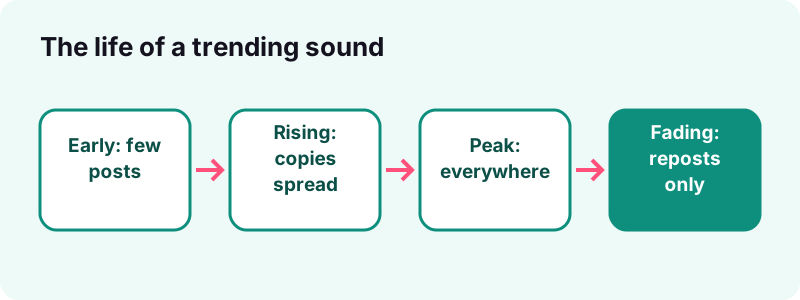
Speed matters more than polish. A good, simple post on a rising sound often beats a perfect post on a sound that is already everywhere. Save the sound the moment you spot it, and plan the idea while it is still growing.
Can an old sound trend again?
Yes. Dreams was a 1977 song when it returned to the charts in 2020 through TikTok, according to Wikipedia. Old songs, film lines and earlier memes come back all the time, so a sound you saved months ago may be worth trying again.
What is TikTok Creative Center?
Creative Center is a TikTok website built for advertisers that has offered trend pages, including a popular music page. When we checked on 17 October 2026, its old music address redirected to a Trends section inside a site titled TikTok One Creative Suite.
We do not link to it here because it sits outside the help pages we cite, and its layout changes often. Search for "TikTok Creative Center" in your browser if you want to try it. The site offers a Log in option, and some parts may need an account.
Is Creative Center better than the app?
It is useful for a wider, less personal view than your own feed. The app is still where you confirm a trend, because you can hear the sound, open its page and see what people are doing with it right now.
Can business accounts use trending sounds?
Only if the sound is licensed for commercial use. TikTok's Sounds help page says a Business Account cannot use music that is not licensed for commercial use, and recommends the Commercial Music Library (CML) for posts that promote a brand, product or service.
“When you post content that promotes a brand, product, or service, we recommend that you only use music from our Commercial Music Library (CML), as it's pre-cleared for commercial use.”
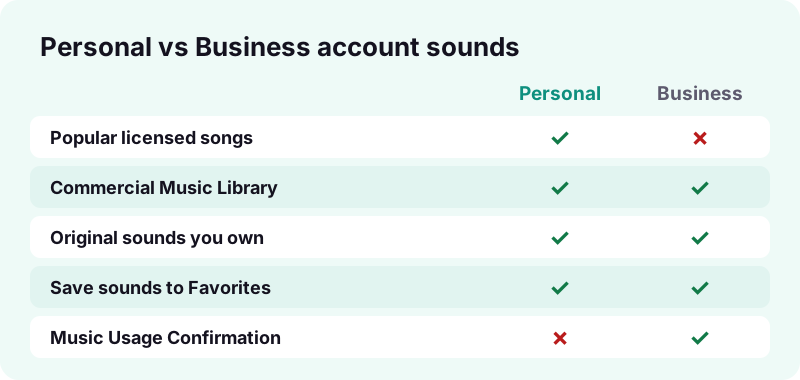
TikTok adds that if you use an original sound or music from outside the CML with the content disclosure setting turned on, you must agree to its Music Usage Confirmation: there is no copyright-protected music in the post, or you hold and paid for the licences.
How do personal and business accounts compare?
| Question | Personal account | Business account |
|---|---|---|
| Popular chart songs | Usually available | Only if licensed for commercial use |
| Commercial Music Library | Available | Recommended by TikTok |
| Original sounds | Yes | Yes, with Music Usage Confirmation if disclosed |
| Promoting a product | Not the purpose | Stick to cleared music |
| Workaround in TikTok's own words | — | Post non-commercial music from a personal account |
If a sound you want is missing on a business profile, licensing is the likely reason. Look for a similar track in the Commercial Music Library rather than trying to force the original.
How do you save trending sounds to Favorites?
Select a sound in Add sound and tap the Favorites button. The sound then waits in the Favorites tab of the Add sound screen, ready for when you have an idea, so you never lose a rising sound while you plan.
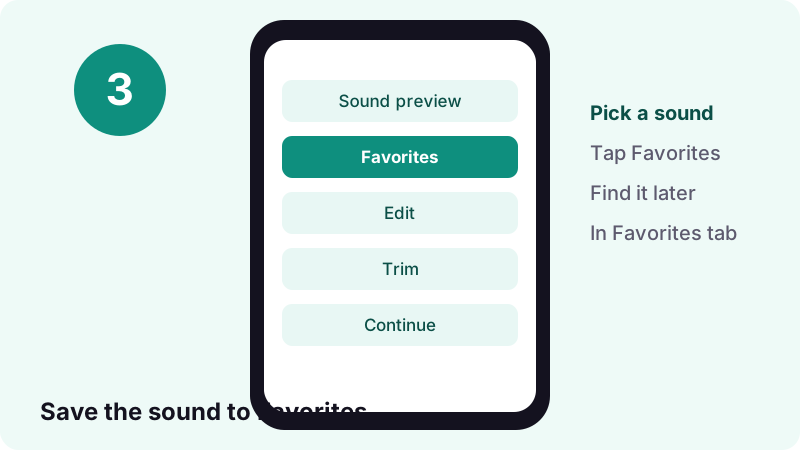
- Open Add sound and tap a sound to preview it.
- Tap the Favorites button to save it.
- Later, open Add sound again and switch to the Favorites tab.
Why is a saved sound missing from Favorites?
TikTok explains that if you upload a long video, sounds that are not available for long videos are hidden from the favorites list. Set the video length to 15s or 60s on the recording page and the sound should appear again.
How do you trim a sound to the part that matters?
Pick the sound, tap the Trim button next to it, drag the slider to the starting point you want, then tap Confirm. Many trending sounds are known for one moment, so starting on that moment helps viewers recognise the trend at once.
- Select a sound to add to your post.
- Tap the Trim button next to it.
- Drag the slider to set where the sound starts.
- Tap Confirm, preview, and adjust again if needed.
Where should the trimmed sound start?
Line up your cuts with the beat or the punchline. If the trend is about a lyric or a line of dialogue, make sure it lands exactly when the action on screen happens.
How do you download trending sounds as audio files?
Copy the link of a public post that uses the sound, paste it into the TikTok MP3 downloader, and save the audio. You get the sound as its own file, handy for editing in another app or keeping a library of sounds.
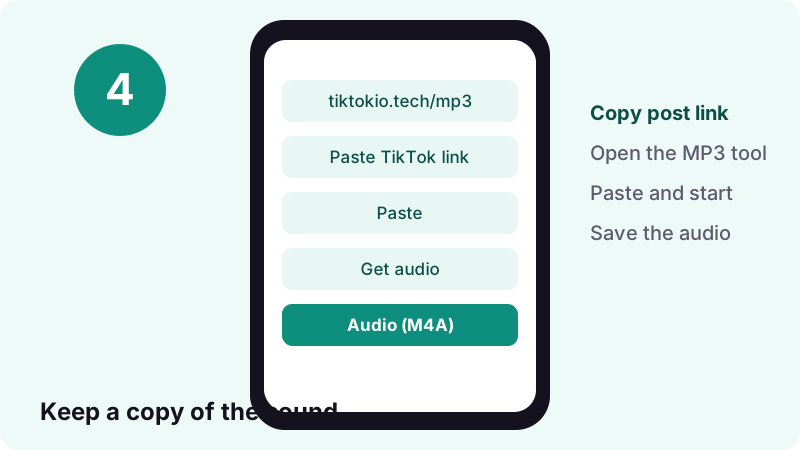
- Works on any phone or computer browser, with no account or app.
- In our tests a public link is read in 0.6 to 1.8 seconds.
- A 15-second sound comes out at about 0.25 MB as M4A.
- Download links expire after 1 hour, and nothing is stored on our side.
On iPhone the file lands in the Files app; Apple's guide to finding downloaded files explains where to look. Want the sound as a phone tone? See how to make a TikTok sound your ringtone.
Only public posts work. If a post is private, deleted or region-blocked, or TikTok does not serve the audio, we cannot get it. Respect copyright: keep downloads for your own use unless you have permission.
How do you add a trending sound to your own post?
Inside TikTok, choose the sound in Add sound, tap Continue to confirm, then record or tap anywhere on your video to add it. You can also add or change the sound later on the editing screen.
Keep in mind a rule from TikTok's Sounds help page: once you change the music successfully, all previous background music and voices in the post are replaced. Record your voiceover after choosing the sound, not before.
Should you use the sound inside TikTok or a downloaded file?
Use the sound inside TikTok whenever you can. That keeps your post linked to the sound page, which is the whole point of joining a trend. A downloaded file is better for editing elsewhere, backups, or a sound library of ideas.
Why can't you find or use a sound?
Usually because of licensing, account type or video length. Music catalogues on TikTok can change: Wikipedia records that Universal Music Group's catalogue of 3 million recordings became unavailable in 2024 after a dispute, and that Taylor Swift's music returned in April 2024.
| What you see | Likely cause | What to try |
|---|---|---|
| Song missing on a business profile | Not licensed for commercial use | Pick from the Commercial Music Library |
| Favorite sound not listed | Long video selected | Set length to 15s or 60s |
| Sound vanished from a post | Rights or catalogue changes | Choose a similar sound |
| No sound when recording | Silent mode or muted volume | Check silent mode, volume and headphones |
| Search shows an error | Temporary issue | Switch Wi-Fi and mobile data, update the app |
TikTok's own advice for search problems is to switch between Wi-Fi and mobile data, clear the app's video cache, restart, and make sure the app is up to date. If you see an error, it suggests waiting at least 24 hours before searching again.
Original sounds vs licensed songs: what is the difference?
A licensed song comes from a label or artist through TikTok's music deals. An original sound is audio a creator recorded and posted, which others can reuse. Many trending sounds are original sounds: a voice line, a joke or a creator's own beat.
| Licensed song | Original sound | |
|---|---|---|
| Who made it | Artist or label | A TikTok creator |
| Can it vanish? | Yes, if licences change | Yes, if the creator deletes it |
| Business use | Only if cleared for commercial use | Needs Music Usage Confirmation when disclosed |
| Typical trend | Dance, lip-sync, edits | Comedy, quotes, voiceovers |
Should you make your own original sound?
Original sounds often trend fastest because they are new to everyone. If you make one that catches on, your name stays attached to the sound page every time someone reuses it.
Do sounds trend differently by country and niche?
Yes. What trends in one country or community can be unknown in another, and TikTok personalises what each person sees. A sound everyone in a gaming niche uses may never reach a cooking audience.
- Follow and watch creators in your own niche so your For You tab reflects it.
- Search sounds with niche words: "gym", "recipe", "study", "car".
- Notice which sounds your own audience mentions in comments.
- Do not chase a sound that clashes with what your viewers expect from you.
TikTok supports many languages; Wikipedia lists 50 language versions of the app. Local-language trends are often less crowded, which makes them a good chance for smaller creators.
A simple weekly routine for sound hunting
Ten minutes a few times a week is enough. The goal is to keep a short list of candidate sounds, check which ones are rising, and act on one or two before they peak.
- Browse Add sound › For You and save anything you hear for the second time.
- Search two or three niche keywords and check the sound results.
- Open the sound pages of saved candidates and look at how recent the posts are.
- Drop sounds that already feel tired; keep the ones still growing.
- Make your post on the best candidate the same day.
- Keep a copy of standout sounds with the MP3 tool for later edits.
Over a few weeks you will notice your own patterns: which kinds of sounds work for your audience, and how fast trends move in your corner of TikTok.
What can you legally do with trending sounds?
Inside TikTok, add sounds through the app's own Add sound feature; TikTok holds music licences for use in the app, though it says those outside the CML don't cover commercial use. Outside the app, songs remain copyrighted. A downloaded file does not give you the right to re-publish it elsewhere.
The U.S. Copyright Office explains that fair use is judged case by case on four factors, including whether the use is commercial and how much of the work is used. Its fair use page is a good plain-English starting point. This is not legal advice.
- Credit the creator of an original sound when you reuse it outside TikTok.
- Use cleared music for ads, sponsored posts and client work.
- Keep downloaded songs for personal use and editing practice.
Tiktokio.tech is an independent tool and is not affiliated with TikTok or ByteDance. Rights holders can contact us through the DMCA page.
Frequently asked questions
How do I find trending sounds on TikTok?
Tap Add post +, then Add sound, and browse the For You tab. Also check Discover, search for sounds by keyword, and open the sound page of posts you like to see how many recent posts use it.
Does TikTok have an official list of trending sounds?
Not in the app's Help Center. The app personalises suggestions, and TikTok's advertiser site, Creative Center, has offered trend pages. Confirm any trend inside the app.
What does the arrow next to a sound mean?
TikTok's Help Center does not document a trending arrow or badge, and labels change between versions. Treat any marker as a hint and check the sound page yourself.
How can I tell if a sound is still rising?
Most posts on its page are recent, small and mid-size creators keep joining, you hear it more each day and people are still finding new twists on it.
Can business accounts use trending sounds?
Only music licensed for commercial use. TikTok recommends the Commercial Music Library for posts that promote a brand, product or service.
How do I save a sound for later?
In Add sound, select the sound and tap the Favorites button. It then appears in the Favorites tab of the Add sound screen.
Why is a sound missing from my Favorites?
If you chose a long video, sounds not available for long videos are hidden. Set the length to 15s or 60s on the recording page.
Can I download a trending sound as an MP3?
Yes. Paste the link of a public post that uses it into the Tiktokio.tech MP3 tool and save the audio file. Private or deleted posts cannot be read.
Why can't I find a popular song on TikTok?
Licences change. Wikipedia records that Universal Music Group's catalogue left TikTok in 2024 after a dispute, and that some music returned later. Business accounts also see fewer songs.
Is it legal to reuse a downloaded TikTok sound?
Using a sound inside TikTok through Add sound is the safe route. Outside the app, songs stay copyrighted, so keep downloads for personal use unless you have permission. This is not legal advice.
Guides
MP3 — Turn the sound of a TikTok into an audio file.
Sources
- Discover and search — TikTok Help Center
- Sounds — TikTok Help Center
- Commercial use of music on TikTok — TikTok Help Center
- TikTok — Wikipedia
- Old Town Road — Wikipedia
- Dreams (Fleetwood Mac song) — Wikipedia
- Find your downloaded files on iPhone — Apple Support
- More Information on Fair Use — U.S. Copyright Office