Set a TikTok sound as your ringtone
- Copy the post link. In TikTok, open a public post that uses the sound, tap Share, then Copy link.
- Save the audio file. Paste the link into the TikTok MP3 downloader and save the sound as an M4A or MP3 file.
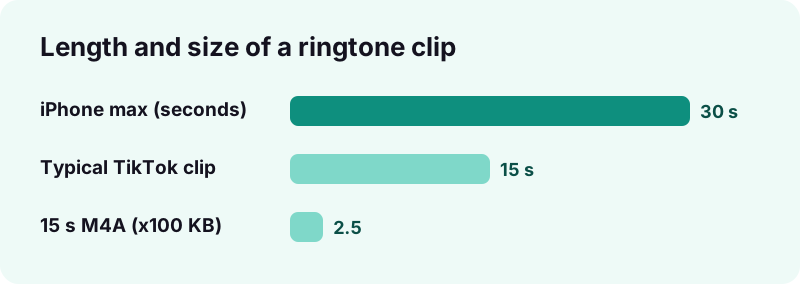
- Trim it. Keep the best 20 to 30 seconds. On iPhone, GarageBand exports ringtones of 30 seconds at most.
- Export or move it. iPhone: in GarageBand, Share, then Ringtone, then Export. Android: place the MP3 in the Ringtones folder.
- Pick it in Settings. iPhone: Settings, Sounds & Haptics, Ringtone. Android: Settings, Sound & vibration, Ringtone.
Can you really use a TikTok sound as a ringtone?
Yes. Any TikTok sound that plays on a public post can become a ringtone once you have it as an audio file. TikTok itself does not offer a "set as ringtone" button, so the job has two halves: get the file, then give it to your phone.
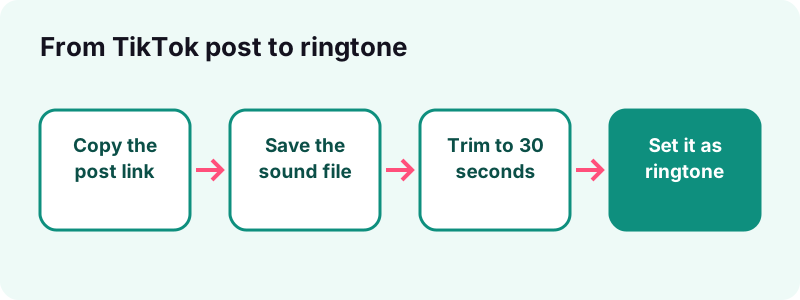
The first half is identical on every phone. The second half depends on the system: iPhone wants the tone to pass through Apple's free GarageBand app, while Android reads an MP3 straight from storage. Both routes cost nothing.
What do you need before you start?
- The link to a public TikTok post that uses the sound.
- A browser: Safari on iPhone, Chrome or any other on Android.
- On iPhone, the free GarageBand app from Apple.
- Around five minutes the first time, two minutes after that.
Step 1: how do you save a TikTok sound as an audio file?
Copy the post link in TikTok, paste it into the TikTok MP3 and audio downloader, and save the sound file it returns. You get the audio alone, without the video, usually as an M4A (AAC) file.
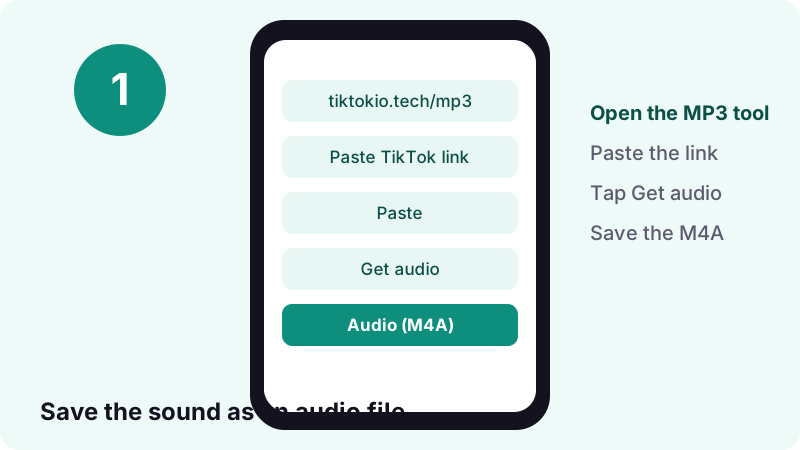
- In the TikTok app, open the post, tap Share, then Copy link.
- Open your browser and go to the MP3 tool on Tiktokio.tech.
- Paste the link and start the download.
- Save the audio file. On iPhone it goes to the Files app; on Android to Downloads.
In our tests the tool reads a public link in 0.6 to 1.8 seconds, and a 15-second TikTok sound comes out at about 0.25 MB. The file is pulled from TikTok's own servers and the download link expires after 1 hour, so save it straight away.
Only public posts work. If a post is private, deleted or blocked in your region, or if TikTok does not serve the audio, we cannot get it either.
Which file format works best for a ringtone?
M4A (AAC) and MP3 both work. GarageBand on iPhone imports either, and Android's own help page talks about MP3 files for ringtones, so pick MP3 when you plan to use the tone on Android and either one for iPhone.
| Format | iPhone (GarageBand) | Android | Note |
|---|---|---|---|
| M4A (AAC) | Imports directly | Plays on most phones | Smallest file, same sound |
| MP3 | Imports directly | The format Google's help page names | Safest choice for Android |
| WAV / AIFF | Imports directly | Varies | Large files, no gain for a phone |
| MP4 video | Needs the audio pulled out | Not offered as a ringtone | Save the sound file instead |
Apple notes that GarageBand converts imported audio to a 44.1 kHz, 16-bit format if the original is different, so you do not need to convert anything yourself before you import.
How do you make a TikTok sound your ringtone on iPhone?
Import the saved file into GarageBand, trim it to 30 seconds or less, then share the song as a ringtone. GarageBand can apply it as your standard ringtone right after export, with no computer and no iTunes.
Import the sound into GarageBand
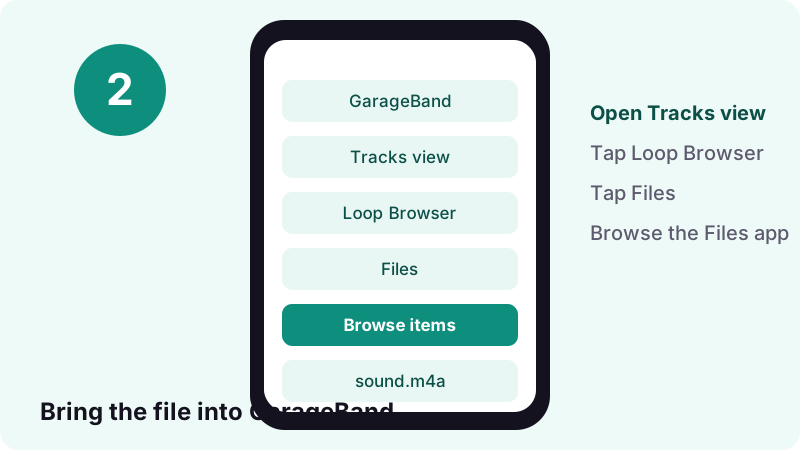
- Open GarageBand and start a new song.
- Tap the Tracks button to switch to Tracks view.
- Tap the Loop Browser button in the control bar, then tap Files.
- Tap Browse items from the Files app and pick your saved TikTok sound.
- Drag the file into Tracks view and line its left edge up with the start of the song.
Set the song section length to Automatic before you import. Apple's guide explains that otherwise only the part that fits the current section comes in. Apple's GarageBand import guide, listed in the sources, shows this step in detail.
Export it as a ringtone
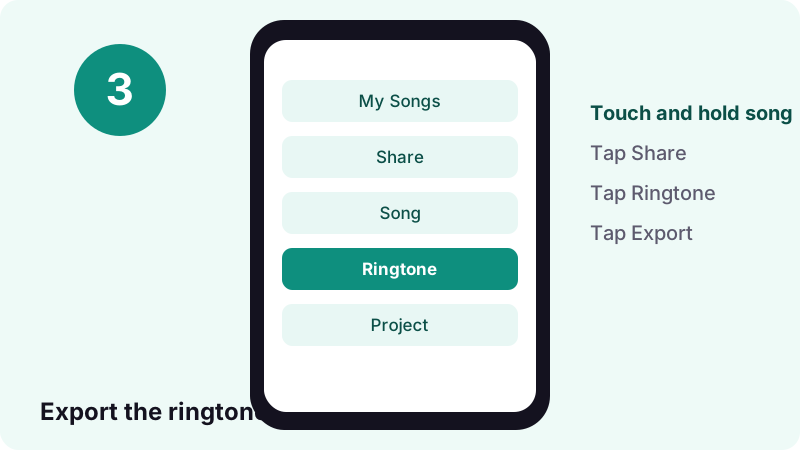
- Go back to My Songs, touch and hold the song, then tap Share.
- Tap Ringtone. The Export Ringtone dialog opens.
- Type a name you will recognise, such as "TikTok tone".
- Tap Export, then Use sound as and choose Standard Ringtone.
“The maximum length for exported ringtones is 30 seconds. If the exported ringtone exceeds the maximum length, a dialog appears. Tap Continue to have GarageBand shorten the ringtone automatically, or tap Cancel to return to the song so you can shorten it.”
Where do you pick the new tone in iPhone Settings?
Open Settings, tap Sounds & Haptics, then tap Ringtone and select your exported tone. If you already chose Standard Ringtone in GarageBand, it is selected already and you only need to check it.
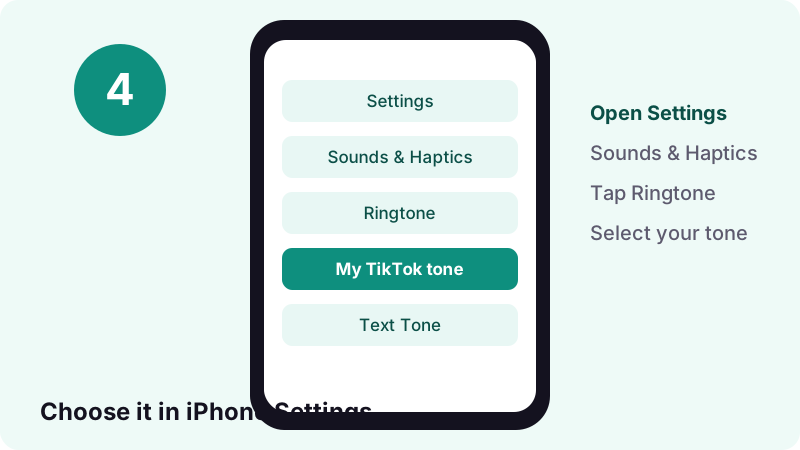
The same screen controls ringer volume and the vibration pattern paired with the tone. Apple's iPhone sounds guide, listed in the sources, covers every option.
Can you give one contact their own TikTok tone?
Yes. In GarageBand's export dialog, tap Assign to contact. Or open the Contacts app, tap the person's name, tap Edit, then choose a ringtone and a text tone. A friend's favourite TikTok sound for their calls is a nice touch.
How do you set it as your ringtone on Android?
Save the sound as an MP3, then open Settings, tap Sound & vibration, then Ringtone, and pick the file. No extra app is needed. If the file does not show up in the list, move it into the phone's Ringtones folder first.
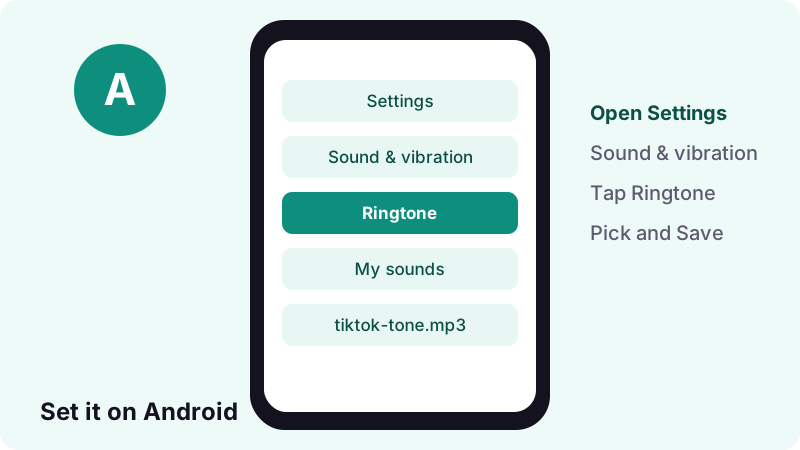
- Save the sound with the MP3 downloader; it lands in Downloads.
- Open the Settings app.
- Tap Sound & vibration, then Ringtone.
- Choose your TikTok file (some phones list it under a "My sounds" or "Added" heading).
- Tap Save.
These are the steps on Google's Android sound settings page. Samsung, Xiaomi and other makers rename menus slightly, but every Android phone has a Ringtone entry under its sound settings.
What if the file is missing from the ringtone list?
Copy the MP3 into the folder named Ringtones on the phone's storage. Google describes doing this from a computer over USB; a file manager app on the phone can move the file to the same folder. Then reopen the Ringtone screen.
Can the sound wake you up as an alarm?
On Android, open the Clock app, tap Alarm, tap an alarm, tap its sound, then tap Add new and select your downloaded file. Google documents this in its Clock help, so a TikTok sound can wake you up with no extra app.
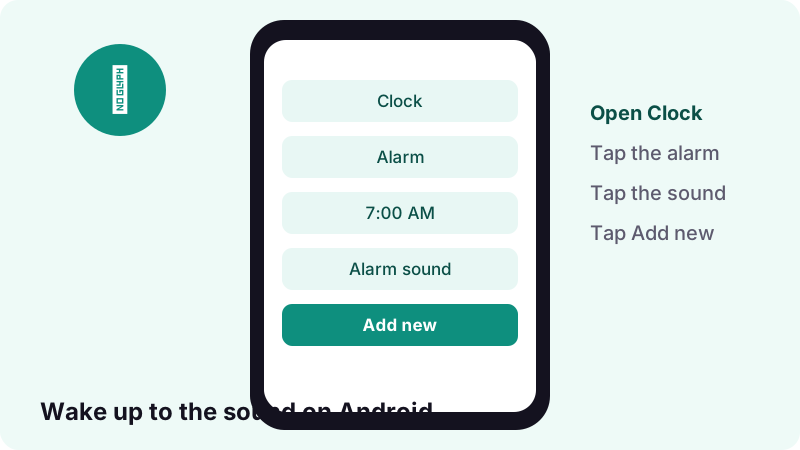
“Alarm and phone ringtones use different folders.”
That is why a tone you can pick for calls may not appear for alarms, and the reverse. Google's Clock app help also warns that if your ringtone is set to silent and vibration is off, the alarm will not go off.
Does it work for iPhone alarms?
Apple's GarageBand guide only documents three uses for an exported tone: standard ringtone, standard text tone and a tone assigned to a contact. It says nothing about alarms, so we will not promise that a custom tone shows in the Clock app on your iPhone.
Can it be your text or notification tone?
Yes on both systems. On iPhone, export from GarageBand and choose Standard Text Tone, or pick it later under Settings, Sounds & Haptics, Text Tone. On Android, open Settings, Sound & vibration, Default notification sound.
| Use | iPhone path | Android path |
|---|---|---|
| Calls | Settings › Sounds & Haptics › Ringtone | Settings › Sound & vibration › Ringtone |
| Texts | Settings › Sounds & Haptics › Text Tone | Settings › Sound & vibration › Default notification sound |
| One contact | Contacts › name › Edit › Ringtone | Contacts › name › More › Set ringtone |
| Alarms | Not documented by Apple for custom tones | Clock › Alarm › sound › Add new |
| One app | Set inside that app, if offered | Set inside that app's notification settings |
For notifications, keep it very short. A two or three-second hook works much better than a full chorus, because a long tone keeps playing after you have already looked at the screen.
How should you trim the clip for a ringtone?
Keep the part that is recognisable within the first two seconds and stop under 30 seconds. On iPhone that limit is enforced: GarageBand cuts anything longer. On Android there is no documented cap, but a call rarely rings longer than half a minute.
How do you trim inside GarageBand?
- In Tracks view, tap the audio region to select it.
- Resize the region from the left so it starts where the hook starts.
- Drag the region back to the start of the song.
- Resize it from the right so the clip ends before 30 seconds.
What makes a good ringtone clip?
- A clear start: no silence or slow fade at the beginning.
- Loud enough on a phone speaker; bass-heavy parts can sound thin.
- A point that loops cleanly, since the tone repeats while the call rings.
- No spoken words you would not want strangers to hear on a bus.
What can go wrong, and how do you fix it?
Most problems come from three things: the post is not public, the file sits in the wrong place, or GarageBand imported only part of the sound. Each one has a quick fix.
| Problem | Likely cause | Fix |
|---|---|---|
| Tool cannot read the post | Private, deleted or region-blocked post | Use another public post with the same sound |
| Download link stopped working | Links expire after 1 hour | Paste the TikTok link again |
| Only a few seconds imported | Song section not set to Automatic | Set Automatic, import again |
| Ringtone is cut short | Longer than 30 seconds on iPhone | Trim to the best 30 seconds yourself |
| File missing on Android | Not in the Ringtones folder | Move the MP3 to Ringtones |
| Alarm stays silent | Ringtone on silent and vibration off | Turn the ringer or vibration back on |
If a post uses a sound you cannot get, open the sound page in TikTok and pick another public video that uses it. Any public post that uses the same sound gives you the same audio file.
Is it legal to use a TikTok sound as your ringtone?
It depends on who owns the sound and where you live. An original sound you or a friend recorded is fine. Commercial songs are protected by copyright, and TikTok's music licences do not cover every use outside the app. This is not legal advice.
“The licenses we hold for music outside of the CML don't cover the commercial use of music in content.”
The U.S. Copyright Office explains that fair use is weighed case by case on four factors, including whether a use is commercial and how much of the work is taken. Its fair use page is the clearest plain-English starting point.
What is the safe way to do it?
- Prefer original sounds, sound effects and your own recordings.
- Keep commercial songs on your own phone only; do not share or sell the tone.
- Never upload the tone to a ringtone site or re-post it as your work.
- If you love the song, buying it supports the artist.
Tiktokio.tech is an independent tool and is not affiliated with TikTok or ByteDance. Rights holders can reach us through our DMCA page.
Which sounds make the best ringtones?
Short, loud, instantly recognisable sounds work best: a beat drop, a catchy hook or a funny voice line. Long slow intros fail because the phone may stop ringing before the good part arrives.
- Calls: a 15 to 30-second hook that loops well.
- Texts: a one to three-second sound effect or voice line.
- Alarms (Android): something that starts gently and gets louder.
- One contact: the sound that person always sends you.
Looking for something new? Our guide on how to find trending sounds on TikTok shows where rising sounds appear before everyone has them.
How do iPhone and Android compare for custom tones?
Android is simpler: the file works as it is. iPhone takes a few more taps because the tone must pass through GarageBand, but it adds a handy per-contact option right in the export dialog.
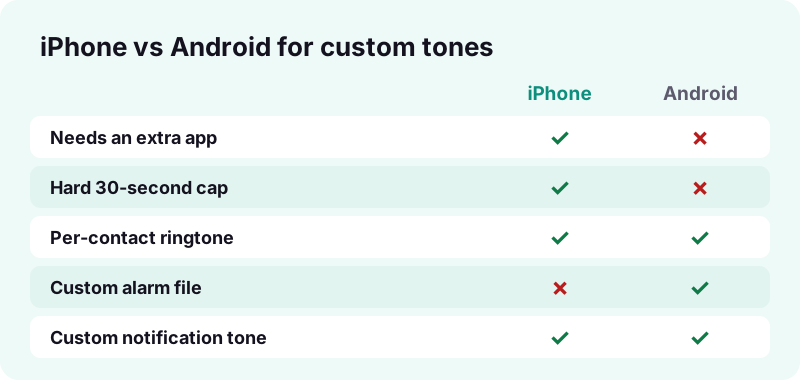
On both systems you can switch back to a built-in tone at any time from the same Ringtone screen. Your TikTok tone stays in the list until you delete it; in GarageBand, open Export Ringtone, tap Your Ringtones and swipe left on a name to remove it.
Can you save the TikTok video too, not only the sound?
Yes. The same link works in our TikTok video downloader, which saves the MP4 without the watermark, and in the HD downloader when TikTok stores a sharper copy. Use the sound file for ringtones and the video for everything else.
Keeping the video can be handy: if you later want a different part of the sound, you still have the full original. For ringtones alone, though, the audio file from the MP3 page is smaller and skips a conversion step.
Quick recap
Here is the whole process in one place, for when you want to change your tone again next month.
- Copy a public post link in TikTok.
- Save the sound with the TikTok MP3 tool.
- iPhone: import into GarageBand, trim under 30 s, Share, Ringtone, Export.
- Android: Settings, Sound & vibration, Ringtone (or the Ringtones folder).
- Alarms on Android: Clock, Alarm, sound, Add new.
Frequently asked questions
How do I make a TikTok sound my ringtone?
Save the sound as an audio file with the Tiktokio.tech MP3 tool, then on iPhone export it as a ringtone from GarageBand, or on Android pick it in Settings, Sound & vibration, Ringtone.
Can I set a TikTok sound as a ringtone without GarageBand on iPhone?
Apple's own help pages document the GarageBand route, which is free and works on the phone itself. That is the method this guide uses.
How long can an iPhone ringtone be?
Apple's GarageBand guide says the maximum length for exported ringtones is 30 seconds. Longer songs are shortened automatically if you tap Continue.
Which format should I download, MP3 or M4A?
Both import into GarageBand on iPhone. For Android, MP3 is the format Google's help page mentions for ringtones, so it is the safest pick.
Why does my TikTok tone not show up on Android?
Move the MP3 into the Ringtones folder on the phone's storage, then reopen Settings, Sound & vibration, Ringtone. Alarm sounds use a different folder.
Can I use a TikTok sound as an alarm?
On Android, yes: Clock, Alarm, tap the alarm sound, then Add new and choose your file. Apple does not document custom alarm files from GarageBand on iPhone.
Can I use a TikTok sound as a text tone?
Yes. On iPhone choose Standard Text Tone after exporting from GarageBand. On Android go to Settings, Sound & vibration, Default notification sound.
Why can't the tool get the sound from a post?
The post may be private, deleted or blocked in your region. If TikTok does not serve the audio, we cannot get it. Try another public post that uses the same sound.
Is it legal to use a song from TikTok as my ringtone?
It depends on the song and your country. Original sounds you own are fine. Commercial songs are copyrighted, so keep the tone private and never share or sell it. This is not legal advice.
Is Tiktokio.tech free and does it need an account?
Yes, it is free and needs no account or app. Download links expire after 1 hour and nothing is stored on our side.
Guides
MP3 — Turn the sound of a TikTok into an audio file.
Sources
- Share songs with GarageBand for iPhone — Apple Support
- Import audio and MIDI files into GarageBand for iPhone — Apple Support
- Change iPhone sounds and vibrations — Apple Support
- Change volume, sound & vibrate settings — Android Help
- Set, cancel, or snooze alarms (Clock) — Google Clock Help
- Sounds — TikTok Help Center
- Commercial use of music on TikTok — TikTok Help Center
- More Information on Fair Use — U.S. Copyright Office