Make a photo slideshow on TikTok
- Start a photo post. In the TikTok app, tap Add post +, then Photo.
- Upload your images. Tap Upload and select up to 35 photos in the order you want, then tap Next.
- Add sound and text. Tap Add sound to pick music, and Text to caption each slide. Crop or filter photos if needed.
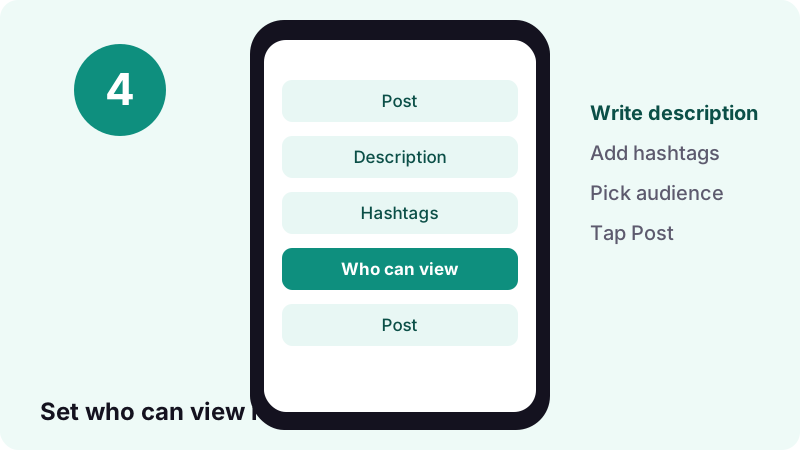
- Write the description. Tap Next, add a description, hashtags and choose who can view the post.
- Post or save. Tap Post to publish, or Drafts to finish later.
What is a slideshow on TikTok?
A slideshow on TikTok is a post made of still images instead of filmed video. TikTok calls the native version Photo Mode: a carousel of pictures that plays one after another with music, and that viewers can also swipe through at their own speed.
“Photo Mode allows you to share carousel posts of still images that automatically display one after another. You can add music to soundtrack the images, which viewers can swipe through at their own pace.”
Photo Mode launched on mobile in October 2022, according to that TikTok newsroom post. Today it is the standard way to share recipes, outfit diaries, travel dumps, step-by-step tips and before-and-after sets without recording a single second of footage.
Already posted one and want the pictures back as files? Jump to the section on saving your images, or open the Tiktokio.tech photo downloader, which saves every image of a public slideshow. For videos, the main Tiktokio.tech downloader does the same job.
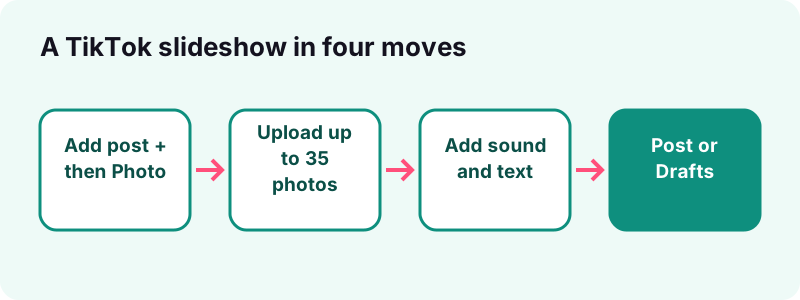
Photo mode, templates or a video slideshow: which should you choose?
Choose Photo Mode for a swipeable carousel, a template when you want ready-made motion and timing, and a video slideshow when every image must appear for an exact length of time. Most creators start with Photo Mode because it is built in and quick.
| Format | How viewers watch it | Best for | What to know |
|---|---|---|---|
| Photo Mode carousel | Images play in order and can be swiped | Tips, lists, outfits, recipes | Up to 35 photos per post, per TikTok Help |
| Template | Plays like a video with preset effects | Quick, polished edits | Templates are not documented step by step in TikTok Help, so menus may differ |
| Video slideshow | A normal video, no swiping | Exact timing, transitions, voiceover | Built in another editor, then uploaded as a video |
Can viewers swipe through a video slideshow?
No. Once your images are baked into a video file, TikTok treats it like any other clip. Swiping only works in Photo Mode, where each picture stays a separate image inside the post.
How do you make a slideshow on TikTok step by step?
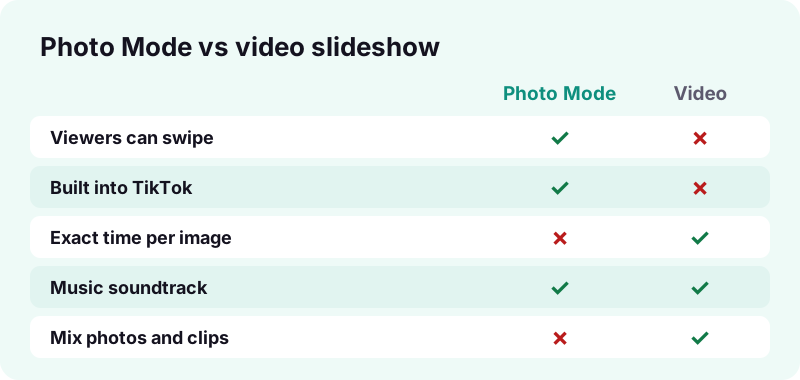
Tap the + button, tap Photo, tap Upload, pick your images and tap Next. Then add sound and text, tap Next again to write a description, and tap Post. These are the steps TikTok's Help Center gives for a photo post.
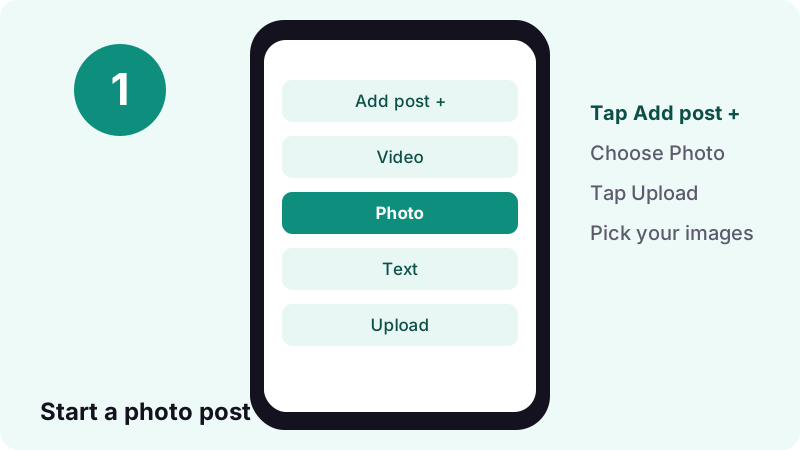
- In the TikTok app, tap the Add post + button at the bottom.
- Tap Photo, then Upload to open your phone's photos.
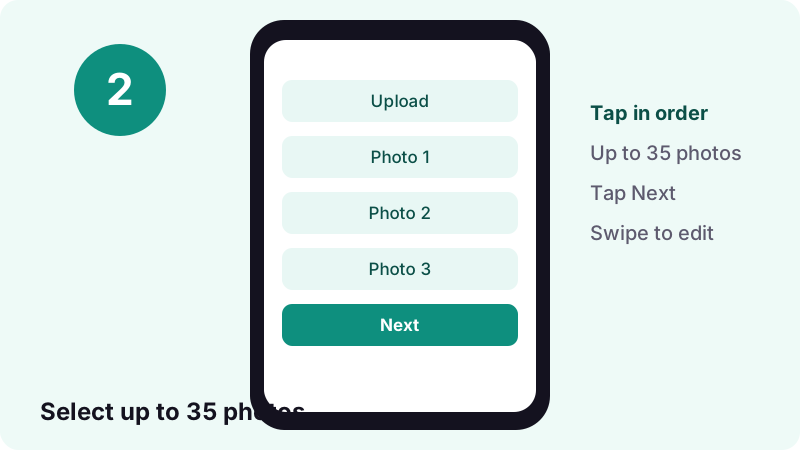
- Select the images in the order you want them to appear.
- Tap Next. Swipe between photos to edit each one.
- Add a sound, text, stickers or a filter, or crop a photo.
- Tap Next to add a description, hashtags and privacy settings.
- Tap Post, or Drafts to finish later.
“Tap Photo, then tap Upload to select photos from your device. You can add up to 35 photos.”
Is it different on iPhone and Android?
No. The TikTok app uses the same buttons on both systems: Add post, Photo, Upload, Next, Post. What differs is how each phone grants TikTok access to your pictures, and the image formats your camera saves.
| Step | iPhone | Android |
|---|---|---|
| Open the creator | Add post + at the bottom | Add post + at the bottom |
| Pick images | Photo, then Upload | Photo, then Upload |
| Photo access | Settings > Privacy & Security > Photos | Settings > Apps > TikTok > Permissions |
| Camera photo format | HEIF with High Efficiency, JPEG with Most Compatible | Depends on the phone maker |
| Finish | Next, then Post | Next, then Post |
How do you make a slideshow on TikTok with an iPhone?
Follow the steps above. If TikTok shows only some of your pictures, it may have limited photo access. Apple's app privacy guide explains that you can review and change which apps reach your Photos under Settings, Privacy & Security.
What changes on an Android phone?
The same taps work. If the Upload screen is empty, check the permission called Photos and videos. Google's app permissions page shows the path: Settings, Apps, choose the app, Permissions, then Allow.
How many photos can a TikTok slideshow have?
Up to 35 photos in one post, according to TikTok's Making a post help page. That limit applies to Photo Mode carousels you upload from your device.
You do not have to use all 35. A short set of five to ten strong images is often easier to follow than a long scroll, but there is no official ideal number, so test what your audience finishes watching.
Can you mix photos and videos in one slideshow?
TikTok's Help Center describes photo posts and video posts as separate types, and its photo steps only mention selecting photos. If you need clips and stills together, build a video slideshow in an editor and upload it as a video.
What size and aspect ratio should slideshow photos be?
TikTok's Help Center pages we read do not publish an official image size or aspect ratio for photo posts, so we will not invent one. What they do confirm is that you can crop each photo while editing.
A practical approach: TikTok is watched on upright phone screens, so vertical images fill more of the view. Shoot in portrait where you can, keep text away from the very top and bottom where buttons and captions sit, and preview before you post.
Do iPhone HEIF photos work?
Apple's HEIF and HEVC article explains that recent iPhones can capture photos as HEIF, which uses less space, and that choosing Settings, Camera, Formats, Most Compatible switches new photos to JPEG. If an image ever fails to load in a third-party app, that setting is the simplest test.
How do you add music to a TikTok slideshow?
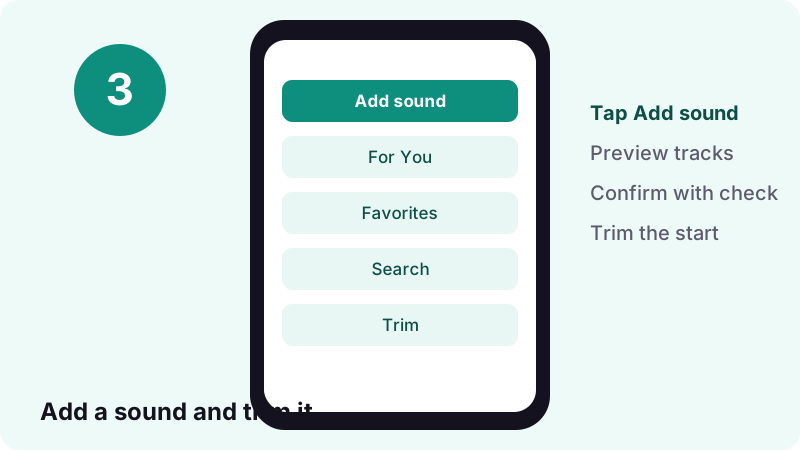
Tap Add sound while editing, preview a few tracks, and pick one. TikTok's Sounds help page says you can choose from the For You, Favorites or Recent tabs, or search, and you can also add a sound on the editing screen.
- On the editing screen, tap Add sound.
- Tap a sound to preview it, or search for one.
- Confirm your choice with the check mark.
- Use Trim and drag the slider to choose where the sound starts.
Why are some songs missing on a business account?
TikTok's Sounds page says business accounts cannot use music that is not licensed for commercial use. Personal accounts have the wider library. If a song you heard elsewhere is missing, this is the usual reason.
Does adding a new sound replace the old one?
Yes. TikTok notes that once you change the music, all previous background music and voices are replaced. Pick your track before you spend time on fine edits.
How do you add text to each slide?
Tap Text on the side panel, type your words and drag them into place. TikTok's editing help explains that you can change the font, colours, background and alignment, and pinch with two fingers to resize.
- Swipe to the photo you want to caption.
- Tap the Text button on the side panel.
- Type, then press and drag the text to its spot.
- Pick a font and use the colour wheel for text and background.
- Tap Done to keep the edit.
How do you remove text or a sticker?
Press and hold it, drag it to the top of the screen until the Delete button appears, and release over it. TikTok's Editing, posting, and deleting page documents the same gesture for stickers and emojis.
How much should each slide say?
One idea per slide works best. Short lines in large type are readable even when a viewer is swiping quickly, and they leave space for the picture itself. Put the details in the description instead.
Can you add stickers or emojis as well?
Yes. TikTok's editing help says to tap Stickers on the side panel, choose the Stickers or Emojis tab or search for animated GIFs, then hold and drag the item into place. You can add several texts and stickers to one post.
How long can the description be?
Up to 2,200 characters per post, according to the October 2022 TikTok newsroom post that introduced Photo Mode. That gives room to add the recipe, the product list or the steps that do not fit on the images.
- Open with the most useful line, so the point is clear even to someone who reads only the start.
- Add a few relevant hashtags rather than a long block.
- Tag the people or places that appear in the photos.
How do you choose who can see your slideshow?
Set the audience on the Post screen. With a public account you can pick Everyone, Friends or Only you; with a private account, Followers, Friends or Only you. You can change it later from the post's More options.
TikTok's Post privacy settings page adds a detail that catches people out: a new post keeps the privacy setting of your previous one. If your last post was Only you, check before tapping Post.
How do you save a TikTok slideshow as a draft?
Tap Drafts instead of Post on the final screen. Drafts are visible only to you, on your profile, until you publish them.
Can drafts disappear?
Yes. TikTok's editing help lists two cases: uninstalling and reinstalling the app, and moving the account to another device. Drafts also cannot be shared between accounts, so finish important ones on the phone where you started.
For a safe copy, turn on Save to device under More options on the Post screen before publishing; TikTok's Download content article recommends it so you keep offline copies. Our guide to saving TikToks to your camera roll covers drafts in more detail.
How do you save your slideshow images afterwards?
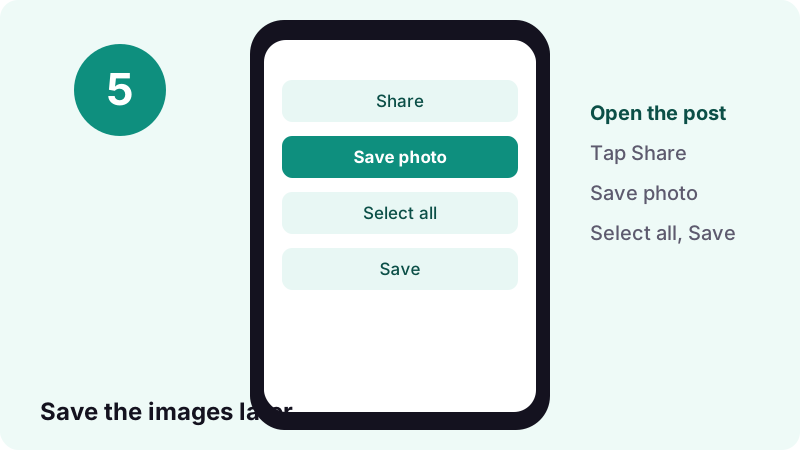
In TikTok, open the photo post, tap Share, tap Save photo, choose Select all or single images, and tap Save. For a public post, the TikTok photo downloader on Tiktokio.tech gets every image as a separate file without the app.
- Open the slideshow in the TikTok app.
- Tap Share.
- Tap Save photo.
- Tap Select all, or pick the images you want.
- Tap Save.
What if Save photo is missing?
Then the creator does not allow downloads, TikTok's Download content page says. The same rule applies to your own posts if your download setting is off, which you can change under Settings and privacy, Privacy, Downloads.
Can you get the song from a slideshow too?
Yes. The TikTok MP3 downloader saves the sound of a public post as an audio file, and our guide to finding trending sounds on TikTok helps you pick music for the next one.
What makes a photo slideshow worth watching?
A clear first image, one idea per slide and a sound that fits the mood. The first picture works like a cover, so it should tell the viewer what they get by swiping.
- Hook first: put the result or the question on slide one.
- Consistent look: same filter and text style across slides.
- Logical order: steps in sequence, or best image last as a payoff.
- Readable text: large type, high contrast, few words.
- Fitting sound: trimmed so the strongest beat lands early.
Which kinds of slideshows work well?
TikTok's own newsroom post pointed to artwork, fashion diaries and photography as early examples. Recipes, packing lists, room makeovers, study notes and travel itineraries follow the same pattern: content that is easier to read than to watch.
Why can't you make a slideshow on TikTok?
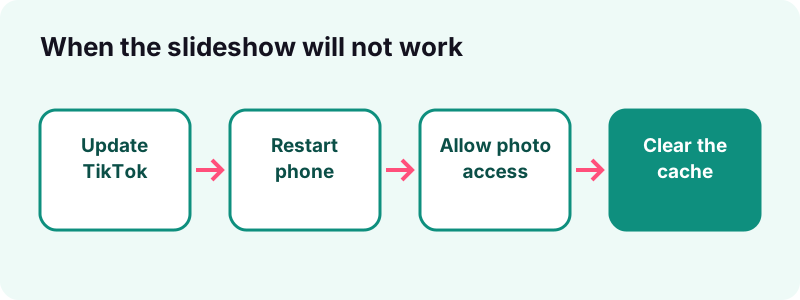
Usually an outdated app, missing photo permission, or a feature that has not reached your account yet. TikTok says it tests new features with a limited number of users, so some options may not be available to you at the same time as others.
- Update the TikTok app and your phone's system software.
- Restart the app and the phone.
- Check that TikTok can access your photos in the phone settings.
- Switch between Wi-Fi and mobile data if uploads stall.
- Clear the cache: Settings and privacy, Free up space, Cache, Clear.
These are the fixes TikTok lists on its Troubleshooting on TikTok page and in the troubleshooting part of Making a post.
Why does the slideshow turn into a video?
Because the post was created as a video rather than a photo post. If you start from the video recorder or upload a video file, TikTok treats the result as a clip, and viewers cannot swipe through the images.
To get a swipeable carousel, start again from Add post + and choose Photo before you tap Upload, as TikTok's help page describes. If you really wanted a video, keep it: video slideshows give you exact timing and transitions.
Why can't you find your slideshow after posting?
Check its privacy setting. TikTok's Making a post page says only public posts show under the posts tab on your profile; private ones sit behind the Lock icon.
If it is still missing, the upload may not have finished. Keep the app open until it completes, and look in Drafts in case you tapped the wrong button on the last screen.
How do you make a video slideshow instead?
Arrange your photos in any video editor, set how long each image stays and add transitions, then export a video and upload it in TikTok with Add post +, Upload. TikTok handles it like any other video post.
When is a video slideshow the better choice?
- When each image must stay on screen for an exact time.
- When you want a voiceover that matches specific slides.
- When you are mixing photos with short video clips.
What about templates?
Templates apply preset motion and effects to your photos. The TikTok Help Center pages we checked do not describe a template feature step by step, and availability can vary, so we do not list tap-by-tap instructions here. If you see one offered in the app, the same rules on music, text and privacy apply.
Can you edit a photo post after publishing?
You can change who can view it from the post's More options, then Privacy settings. The Help Center pages we read do not describe swapping images in a published photo post, so plan on deleting and reposting if a photo needs to change.
Deleted posts are not gone straight away. TikTok keeps them for up to 30 days in Recently deleted, under Settings and privacy, Activity center, where you can restore them along with their comments and likes.
Should you use other people's photos in a slideshow?
Only if you have permission or they are your own. A slideshow made from someone else's pictures is still their work, even when you add music and text on top.
- Use your own photos, or images you are licensed to use.
- Credit the photographer or creator in the description.
- Ask before reusing images from another TikTok post.
Tiktokio.tech is an independent tool and is not affiliated with TikTok or ByteDance. Save only your own content, or content you have permission to reuse. Rights holders can contact us through our DMCA page.
How do you plan a slideshow before you open the app?
Pick one topic, gather the images in a single album and decide the order before you tap Add post. Planning outside TikTok saves time, because the picker shows your whole library and it is easy to tap the wrong photo.
Why build an album first?
Selecting from one small album means you tap images in the right order the first time, and nothing personal slips into the post by accident. Delete blurry or duplicate shots there, not inside TikTok.
- Write the slide captions in your notes app first.
- Choose a cover image that explains the whole post at a glance.
- Shortlist two or three sounds that match the pace you want.
How should you order the slides?
Follow the way people read a story. Open with the promise, such as the finished dish or the final room, then show the steps, then close with a recap or a question that invites comments. A clear arc makes a slideshow on TikTok feel complete, so viewers are more likely to swipe to the end.
Quick checklist before you post
Run through this list once and most slideshows go out right the first time.
| Check | Why it matters |
|---|---|
| Created with Photo, not video | Keeps the carousel swipeable |
| No more than 35 images | TikTok's documented limit for a photo post |
| Sound chosen before fine edits | A new sound replaces previous music and voices |
| Text readable on a small screen | Viewers swipe fast |
| Privacy set on the Post screen | New posts inherit the last post's setting |
| Save to device turned on | Keeps an offline copy in your gallery |
When it is live, you can save the images again later with the TikTok photo downloader, or the whole set from the Share menu.
Frequently asked questions
How do you make a slideshow on TikTok?
Tap Add post +, tap Photo, tap Upload, select your images and tap Next. Add a sound and text, tap Next, write a description and tap Post.
What is photo mode on TikTok?
Photo Mode is TikTok's carousel format for still images. The pictures play one after another with music, and viewers can swipe through them at their own pace.
How many pictures can you put in a TikTok slideshow?
Up to 35 photos per post, according to TikTok's Making a post help page.
Why is my TikTok slideshow a video instead of photos?
It was created as a video post. Start from Add post +, tap Photo and then Upload so the images stay a swipeable carousel.
Can you add music to a TikTok slideshow?
Yes. Tap Add sound while editing, pick a track and trim it. Business accounts can only use music licensed for commercial use.
How long can a TikTok slideshow description be?
Up to 2,200 characters per post, as announced in TikTok's October 2022 newsroom post on Photo Mode.
What aspect ratio should TikTok slideshow photos be?
TikTok's help pages do not publish an official size for photo posts. Vertical images fill more of a phone screen, and you can crop each photo while editing.
How do I download the photos from a TikTok slideshow?
Tap Share, Save photo, Select all, then Save. For a public post you can also use the Tiktokio.tech photo downloader to get every image.
Why can't I find photo mode on TikTok?
Update the app, restart your phone and check photo permissions. TikTok tests features with limited groups, so some options may reach your account later.
Can I save a TikTok slideshow as a draft?
Yes. Tap Drafts instead of Post. Drafts are only visible to you, but they can be lost if you reinstall the app or switch devices.
Photos
TikTok Photo Downloader – Save Every Slideshow Image — Save every image of a TikTok photo slideshow.
Sources
- Making a post — TikTok Help Center
- Inspiring creativity with our new editing tools (Oct 6, 2022) — TikTok Newsroom
- Sounds — TikTok Help Center
- Editing, posting, and deleting — TikTok Help Center
- Download content — TikTok Help Center
- Post privacy settings — TikTok Help Center
- Troubleshooting on TikTok — TikTok Help Center
- Using HEIF or HEVC media on Apple devices — Apple Support
- Control access to information in apps on iPhone — Apple Support
- Change app permissions on your Android phone — Android Help