How to download TikTok photos in 3 steps
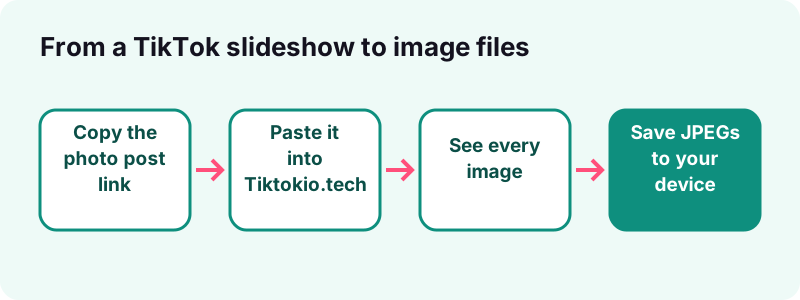
- Copy the photo post link. Open the slideshow in the TikTok app or on tiktok.com, tap Share, then Copy link.
- Paste it into Tiktokio.tech. Come back to this page, paste the link in the box at the top and tap Download.
- Save the images. Every image of the post appears as a separate JPEG. Save the ones you want, or all of them, and add the audio if you need the music.
What does this TikTok photo downloader do?
It takes the link of a public TikTok photo post and returns each picture in it as its own image file, plus the sound the creator chose. You do not install anything and you do not log in to TikTok.
A photo post can hold many pictures. TikTok's own guide to making a post says you can add up to 35 photos to one post, so a single link can give you a long series of files.
What do you get from one photo post link?
- Every image of the slideshow, one JPEG file per picture, in the order the creator set.
- The cover image of the post.
- The sound of the post as an audio file, when TikTok serves it. The TikTok MP3 downloader covers that part in detail.
- File names that start with the creator's username and the post ID, so the pictures stay grouped.
What does it not do?
- It does not open private accounts, deleted posts, drafts or posts blocked in your region.
- It does not turn the slideshow into an MP4. You get the pictures and the audio as separate files.
- It does not keep a copy. Download links expire after one hour and nothing is stored on our side.
For clips, use the main TikTok video downloader; for the best clip quality, the HD downloader; for a story, the story downloader. All tools on the site:
What are TikTok photo posts and slideshows?
A photo post is a TikTok made of still images instead of a video clip. Viewers swipe through the pictures, often with a song playing over them. People call it photo mode, a carousel or a TikTok slideshow; it is the same kind of post.
TikTok's help center describes the steps: in the app you tap Add post, then Photo, then Upload to pick pictures from your device. Before posting, the creator can change each slide:
- add a filter or a sound,
- type text or place stickers,
- crop a photo,
- edit the cover, description, hashtags and privacy settings.
Text and stickers placed on a slide become part of that picture, so a TikTok photo downloader saves them with it.
How many photos can one TikTok post hold?
Up to 35, according to TikTok's Making a post page (read on 17 October 2026). The two public posts we tested on that date had 2 and 3 images.
Is a photo post different from a live photo?
Yes. TikTok also lets you take a live photo with the Record button in the camera. That is one capture posted to the feed. A slideshow is a set of uploaded pictures.
- Slideshow: several uploaded images, swiped one by one.
- Live photo: one capture taken in the TikTok camera.
- This page is about the slideshow kind, where each picture is a separate image.
| Post type | What it contains | What Tiktokio.tech gives you |
|---|---|---|
| Video post | One video clip | MP4 without watermark, HD when available, audio |
| Photo post (slideshow) | 1 to 35 still images + sound | Each image as a JPEG, cover, audio |
| Story | Photo or video visible 24 hours | The story file while it is public and live |
| Text post | Text on a background | Usually nothing to download |
If you want to make your own slideshow rather than save one, read how to make a slideshow on TikTok.
How do you download TikTok photos with Tiktokio.tech?
Copy the link of the photo post, paste it in the box at the top of this page and tap Download. The TikTok photo downloader shows the images a second or two later, and each one has its own save button.
- Open the photo post in the TikTok app or on tiktok.com.
- Tap Share, then Copy link. On a computer, copy the address from the browser bar.
- Paste the link into the Tiktokio.tech box and tap Download.
- Save each image you want, or save them all one after another.
- Optional: tap the audio button to keep the song as well, or use the MP3 page.
Which links work?
- Full links such as
tiktok.com/@name/photo/followed by a long number. - Short share links from the app, such as
vt.tiktok.com/…orvm.tiktok.com/…. - Links copied from
m.tiktok.comin a mobile browser.
How long does it take?
On real public posts our server reads a link in about 0.6 to 1.8 seconds. In our test on 17 October 2026, two public photo posts resolved in just under one second each.
After that, the speed of the TikTok photo downloader depends on a few things:
- your own connection, because images come straight from TikTok's CDN;
- the number of slides, up to 35 per post;
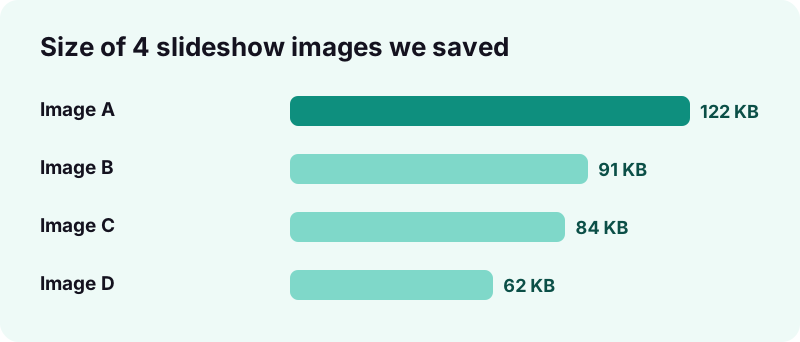
- the size of each picture, which was 62 KB to 122 KB in our test.
The download links are valid for one hour. If you come back later, paste the TikTok link again to get fresh ones.
Save every image or the slideshow as a video?
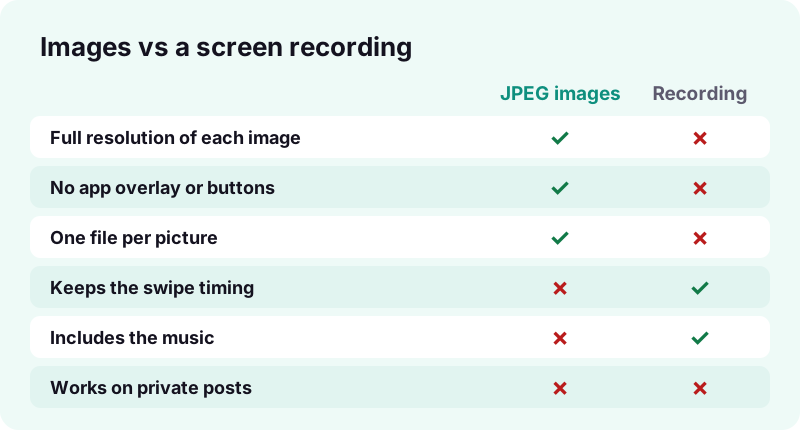
Saving the images gives you each picture at the size TikTok stores it, without buttons or captions on top. A video of the slideshow keeps the swipe timing and the music, but it is a screen capture, so quality and framing depend on your screen.
When are separate images the better choice?
- You want to print a picture, use it as a wallpaper or edit it.
- You posted the slideshow yourself and lost the originals.
- You need one specific slide, such as a recipe card or a list.
How do you keep the slideshow as a video?
Tiktokio.tech does not render slideshows into MP4. Two honest options remain:
- Rebuild it. Save the slides with the TikTok photo downloader, then put the saved images and the saved audio into any video editor. Our guide on making a TikTok slideshow shows the order of steps.
- Record your screen. Apple explains screen recording on iPhone from Control Center, and Google explains it for Android from Quick Settings. Apple notes that some apps might not allow you to record audio or video.
For the soundtrack alone, the TikTok audio downloader saves it as an M4A or MP3 file. A 15-second sound weighs about 0.25 MB.
What image format do TikTok slideshow photos use?
The images we fetch are JPEG files. On 17 October 2026 we saved pictures from two public photo posts and checked the files: every one started with the JPEG signature ff d8 ff, and TikTok's CDN sent them as image/jpeg.
JPEG is a lossy image format first released in 1992, and it opens on every phone, computer and photo editor. That makes it the easiest format to keep, print or edit.
| What we measured | Result (17 Oct 2026) |
|---|---|
| File type sent by TikTok's CDN | image/jpeg |
| Pixel size, post 1 | 1080 × 1440 |
| Pixel size, post 2 | 1320 × 2346 |
| File size per image | 62 KB to 122 KB |
| Photo posts tested | 2 public posts, 5 images |
Why JPEG files are handy:
- They open in the Photos app, Google Photos, Windows Photos and any browser.
- They print without conversion.
- They work as wallpapers and in every slideshow or video editor.
Are TikTok photos WebP or HEIC?
Not in our test. Our server asks TikTok for the JPEG version of each slide when one is listed.
HEIC is the HEIF photo format that iPhones capture; Apple's HEIF and HEVC page says iOS 11 introduced it and that it compresses better than JPEG. What you save from a slideshow is the copy TikTok serves, not the creator's original camera file.
Is the quality the same as the original upload?
It is the copy TikTok makes public for that post, which can be smaller than the photo the creator took. Our test images were 1080 and 1320 pixels wide. No downloader can add back pixels TikTok did not keep.
How do you save TikTok photos to the gallery on iPhone?
Download the images in Safari, open them from the Downloads folder in the Files app, then use the share sheet to put them in Photos. It takes about a minute for a 6-image slideshow.
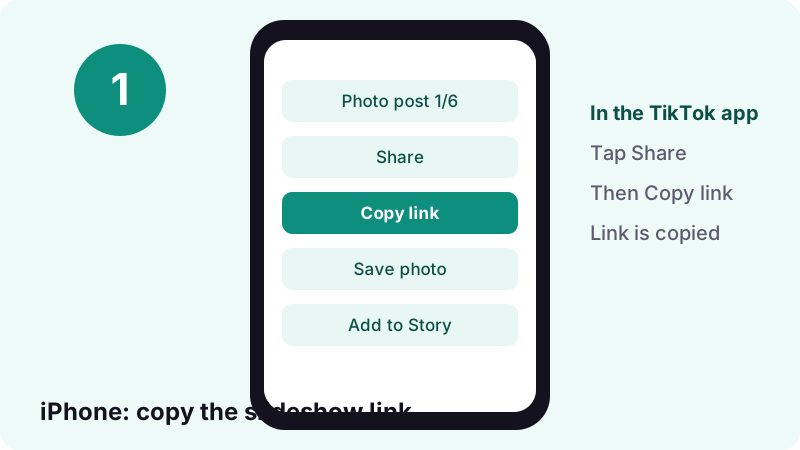
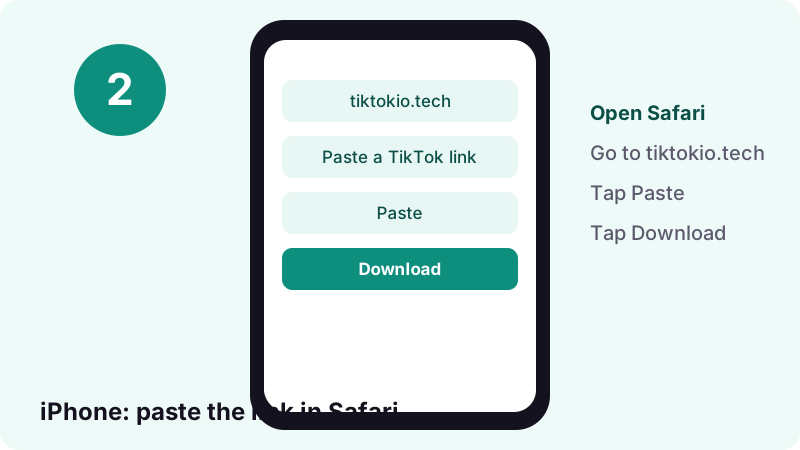
- In TikTok, open the photo post, tap Share, then Copy link.
- Open Safari, go to tiktokio.tech and paste the link. Tap Download.
- Tap the save button under each image. Safari stores the files in Downloads.
- Open the Files app, tap Browse, then the Downloads folder.
- Open an image, tap Share, then Save Image to add it to Photos.
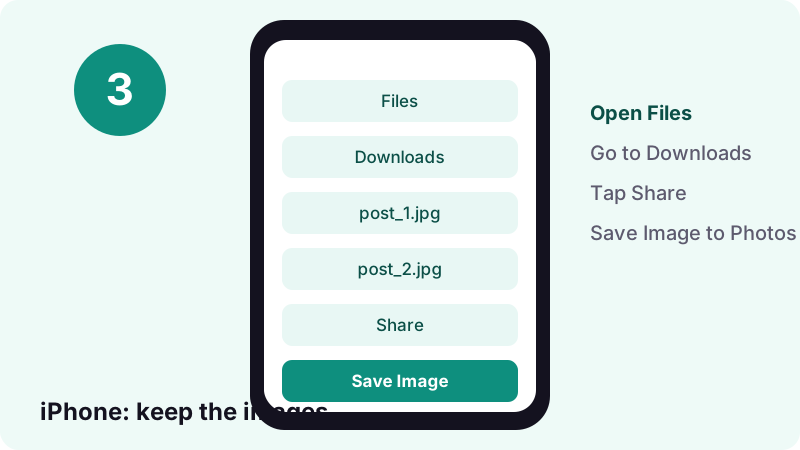
Apple's guide to finding downloads confirms the path: files downloaded from the internet go to the Downloads folder in Files, and Safari has its own Downloads button next to the search field. Apple's photo-saving steps use the same Share, then Save Image action.
Why does the image open in a new tab instead?
Then the file is still downloading or Safari is showing a preview. Tap the Downloads button next to the search field, as Apple describes, and open the finished file from there.
How do you save TikTok photos to the gallery on Android?
Paste the link in Chrome, tap Download, and save each image. Android places the JPEGs in the Downloads folder, and most gallery apps list that folder on their own.
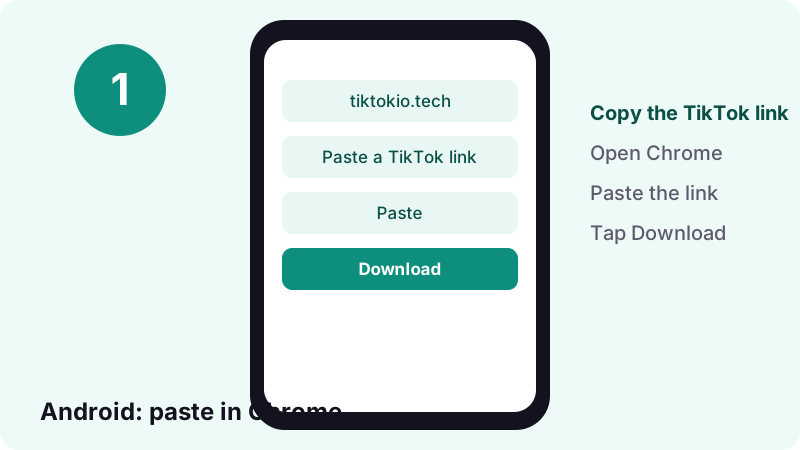
- In TikTok, tap Share on the photo post, then Copy link.
- Open Chrome, go to tiktokio.tech, paste the link and tap Download.
- Tap the save button under every image you want.
- Open the Files app and look in Downloads, or open your gallery app.
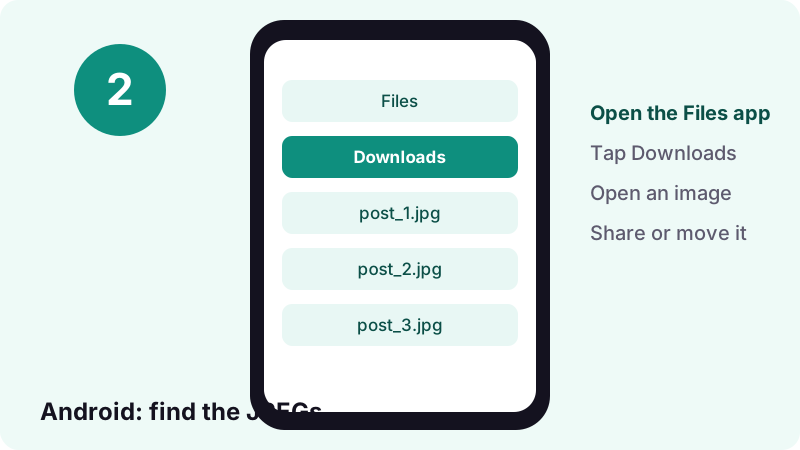
Google's Android Help says files usually live in the Files app, though your device maker might ship a different app. From there you can touch and hold a file to share it or add it to Google Drive.
What if the images do not show in Google Photos?
- Open Google Photos, go to Collections, then the folders on this device, and look for Download.
- If the folder is missing, open the file once from Files; most galleries then pick it up.
Can you download TikTok photos on a computer?
Yes. On Windows, macOS, Linux or a Chromebook, open the photo post on tiktok.com, copy the address from the browser bar and paste it here. The images save to your usual Downloads folder.
- Chrome, Edge, Firefox and Safari all work; there is no extension to add.
- Right-click an image and choose to save it if your browser opens it instead of downloading.
- Drag the saved JPEGs into any photo editor or slideshow app.
- Open the photo post on tiktok.com.
- Copy the address from the browser bar.
- Paste it into the box on this TikTok photo downloader page and press Download.
- Save each image; the files go to your Downloads folder.
Is a computer better for long slideshows?
It is faster for 20 or more slides, because you can save files in quick succession and sort them in one folder. The file names carry a number at the end, so the order of the slideshow survives.
Does TikTok let you save photos without a downloader?
Sometimes. TikTok's app has a Save photo option in the Share menu, but only when the creator allows downloads. When the creator turned that off, the option is simply missing.
“If you don't have the option to save a photo, this means the creator doesn't allow it.”
How does TikTok's own Save photo work?
- Go to the photo post in the TikTok app.
- Tap Share, then Save photo.
- Tap Select all or pick the photos you want.
- Tap Save.
| TikTok Save photo | Tiktokio.tech | |
|---|---|---|
| Needs the TikTok app | Yes | No, any browser |
| Works when creator blocks downloads | No | Only if TikTok still serves the files |
| Gives the sound file | No | Yes, as M4A/MP3 |
| Works on a computer | No (app feature) | Yes |
We respect the same limit: if TikTok does not serve the file, we cannot get it. And when a creator has said no to downloads, take that as a no.
Why won't a TikTok photo post download?
Most failures come from the post itself: it is private, deleted, still a draft or blocked where our server sits. A wrong or broken link is the second cause.
Which errors are common, and what fixes them?
- Private account. TikTok's privacy page says people cannot download posts from a private account. We cannot either.
- Post removed. If the creator deleted it, TikTok returns nothing.
- Link cut short. Copy it again with Share, then Copy link, instead of selecting text by hand.
- Old download links. They expire after an hour. Paste the TikTok link again.
- Video, not photos. If the post is a clip, the video downloader handles it, and the HD downloader looks for the best copy.
What should you check first?
- Open the link in a private browser window. If TikTok shows the photos, the post is public.
- Copy a fresh link from the Share menu.
- Paste it here again and wait a few seconds.
Why do some slides come out smaller than others?
Creators upload pictures of different sizes, and TikTok keeps each at its own size. In our test, one post gave 1080 × 1440 images and another gave 1320 × 2346.
Is it legal to download TikTok photos?
Saving a public post for your own viewing is a different act from re-posting it. Photos belong to whoever took or made them, and TikTok's sharing rules do not hand you their copyright.
What is fair to do with saved slideshow images?
- Keep your own photo posts as a backup.
- Save a recipe, guide or list to read offline.
- Re-use someone else's images only with their permission, and credit them.
- Do not sell, re-upload or pass off another person's pictures as yours.
Before you reuse a slide from someone else, ask yourself:
- Do I have the creator's permission in writing, such as a reply or a DM?
- Am I crediting them by their TikTok username?
- Would the use still make sense if they saw it?
Tiktokio.tech is an independent tool, not linked to TikTok or ByteDance. See our terms. If you own a photo and want it blocked from this site, our DMCA page explains how to reach us.
Is the TikTok photo downloader free and private?
Yes, it is free, with no sign-up and no daily cap. We do not ask for your TikTok login, and we do not keep the images: each download link points to TikTok's CDN and expires after one hour.
- No account, no app, no browser extension.
- No watermark is added to the images.
- The same page works on iPhone, Android, tablet and computer.
What this TikTok photo downloader never asks for:
- your TikTok username or password,
- your email address or phone number,
- a payment or a subscription.
Read the privacy policy for the details, or go back to the home page for video downloads.
Frequently asked questions
How do I use the TikTok photo downloader?
Copy the photo post link with Share, then Copy link. Paste it in the box at the top of this page and tap Download. Each image of the slideshow appears with its own save button.
Can I download all photos from a TikTok slideshow at once?
You get every image of the post in one result, and you save them one after another. A post can hold up to 35 photos, according to TikTok's help center.
What format are the downloaded TikTok photos?
JPEG. In our test on 17 October 2026, every slideshow image TikTok's CDN sent us was a JPEG file between 62 KB and 122 KB.
Can I download a TikTok slideshow as a video?
Not with this site. You can save the images and the sound, then join them in a video editor, or record your screen with the iPhone or Android screen recorder.
Can I get the music from a photo post?
Yes. When TikTok serves the sound, the result includes an audio button. The TikTok MP3 page explains audio downloads in more detail.
Does the creator know I saved their photos?
Tiktokio.tech does not log in to TikTok and does not send any notice. It only reads the public post the link points to.
Why is there no Save photo option in the TikTok app?
TikTok's help center says that if the option is missing, the creator does not allow downloads. Respect that choice for other people's posts.
Can I download photos from a private TikTok account?
No. Private posts are not public, so TikTok does not serve them to us, and we do not try to get around that.
Do the photos have a watermark?
No watermark is added. If the creator typed text or added stickers on a slide, that is part of the picture and stays.
Is this an official TikTok tool?
No. Tiktokio.tech is an independent tool and is not affiliated with tiktokio.com, TikTok or ByteDance.
Guides
Sources
- Download content — TikTok Help Center
- Making a post — TikTok Help Center
- Choosing between a private or public account — TikTok Help Center
- Where to find downloads on your iPhone or iPad — Apple Support
- How to save photos from a shared album — Apple Support
- Using HEIF or HEVC media on Apple devices — Apple Support
- Record the screen on your iPhone, iPad, or iPod touch — Apple Support
- Take a screenshot or record your screen on your Android device — Android Help
- Find & delete files on Android — Android Help
- JPEG — Wikipedia