Save a TikTok video to your camera roll
- Try TikTok's Save video. Open the video, tap Share, then Save video. If it is missing, the creator does not allow downloads.
- Copy the link. In the Share menu, tap Copy link.
- Paste it into Tiktokio.tech. Open your browser, go to Tiktokio.tech, paste the link and tap Download.
- Pick the MP4. Choose the MP4 without watermark, or the HD file if your phone plays HEVC.
- Move it into your camera roll. On iPhone open Files, Downloads, tap the video, then Share and Save Video. On Android open the Files app and find it in Downloads.
What does it mean to save a TikTok to your camera roll?
To save TikTok to camera roll means getting a real video file into the gallery app on your phone, so the clip plays offline and can be shared anywhere. On iPhone that place is the Photos app; on Android it is Google Photos or your phone maker's Gallery app.
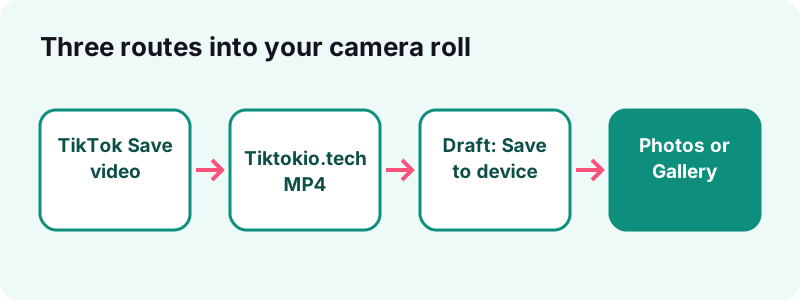
There are two honest ways to save TikTok to camera roll. The first is the Save video button inside TikTok, which only shows up when the creator allows downloads. The second is a web tool such as Tiktokio.tech, which fetches the file TikTok already serves for a public post and hands it to your browser.
What will you have at the end of this guide?
- A clip in Photos or Gallery that plays with no signal.
- A clear idea of why Save video is sometimes missing.
- A way to keep your own drafts before you publish them.
- Fixes for the three usual blockers: storage, permissions and files that land in the wrong folder.
Which method should you use?
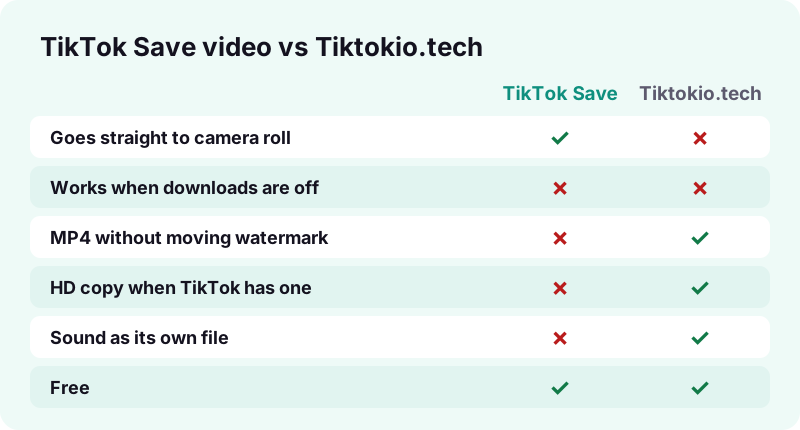
Use TikTok's own Save video when it is available and you do not mind a watermark; use Tiktokio.tech when you want a clean MP4, an HD copy or just the sound. For your own unposted work, use TikTok's Save to device option on drafts.
| Method | Where the file lands | Watermark | Needs the creator's download setting? |
|---|---|---|---|
| TikTok Save video | Photos (iPhone) or Gallery (Android) directly | May include the TikTok watermark and username | Yes, the button is hidden when downloads are off |
| Tiktokio.tech in the browser | Files > Downloads (iPhone) or Downloads (Android), then you move it | No moving watermark on the MP4 | We can only fetch what TikTok serves for a public post |
| TikTok Save to device on a draft | Your gallery | None by default | No, it is your own draft |
| Screen recording | Photos or Gallery | Captures whatever is on screen, interface included | No, but quality and copyright are on you |
For most people the shortest path is TikTok's button first. If it is not there, or you need a file without the logo bouncing around, switch to the browser route described below.
What do you need before you start?
Very little. To save TikTok to camera roll you need the TikTok app or tiktok.com to copy the link, a browser that is already on your phone, and some free space. You do not need an account on our site, a paid app or a computer.
- A public post, or your own post or draft.
- Enough free storage for a video file, usually a few megabytes.
- Permission for TikTok, or your browser, to add items to your photo library.
How do you save a TikTok with the built-in Save video button?
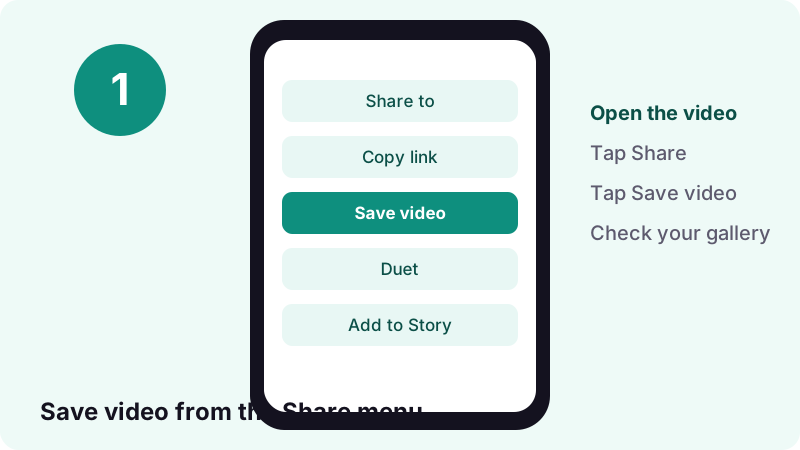
Open the video, tap Share, then tap Save video. TikTok writes the file straight into your phone's photo gallery and shows a short confirmation when it is done.
- In the TikTok app, go to the video you want to keep.
- Tap the Share arrow on the side of the screen.
- Tap Save video in the share menu.
- Wait for the confirmation, then open Photos or Gallery to check.
If nothing happens after the tap, give it a few seconds, especially on a slow or crowded connection. Long videos take longer to write to the phone than a short clip, and leaving the app too early can cancel the save.
Is there a faster way than the Share menu?
Yes. TikTok's Help Center describes a quick save: press and hold on the video, then pick Save video from the pop-up menu. The clip goes to your gallery automatically, which saves one tap when you are collecting several posts.
Both routes are documented on TikTok's own page, How to save TikTok videos to your device. They lead to the same file, so pick whichever feels natural.
Why is Save video greyed out or missing?
Because the creator has turned off downloads for their posts. TikTok does not show the save option at all in that case, and no setting on your side can bring it back.
“If you don't have the option to save a video, this means the creator doesn't allow it.”
Which accounts block downloads automatically?
TikTok's Manage video downloads page says the download setting is off by default, and cannot be switched on, when an account is private or when the user is under 16. If the creator later makes the account public, they can choose to allow downloads.
Does turning downloads off affect copies people already saved?
No. According to the same TikTok page, files that were saved while downloads were allowed stay on the other person's device. Switching the setting off only stops new saves of old and future posts.
- Private post: cannot be saved by anyone except the owner.
- Public post, downloads off: no Save video button for viewers.
- Public post, downloads on: Save video appears in the Share menu.
- Deleted or region-blocked post: nothing left to save.
How do you save a TikTok to camera roll with Tiktokio.tech?
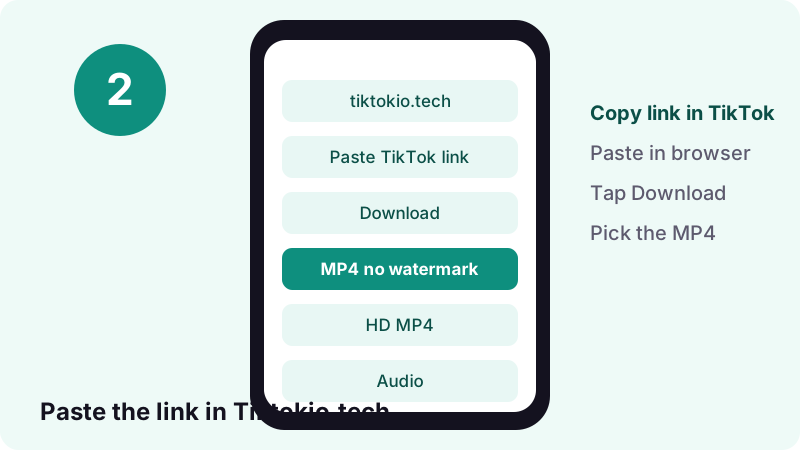
Copy the TikTok link, paste it into Tiktokio.tech in your browser, tap Download and pick the MP4. It is the fallback way to save TikTok to camera roll when the app's button is gone. The file arrives in your browser's downloads, and from there one more step moves it into Photos or Gallery.
- In TikTok, tap Share and then Copy link.
- Open Safari, Chrome or any browser and go to Tiktokio.tech.
- Paste the link into the box and tap Download.
- Choose MP4 without watermark or the HD file when one is offered.
- Confirm the download, then follow the iPhone or Android section below.
How long does it take?
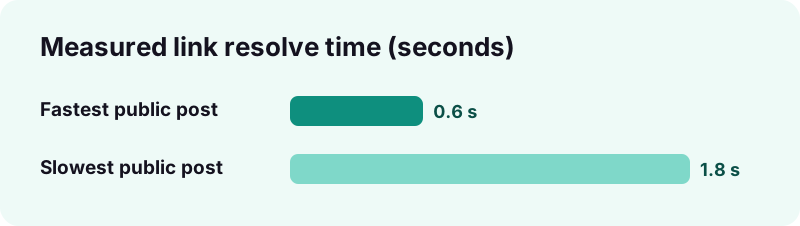
On real public posts we measured our tool resolving a link in 0.6 to 1.8 seconds. The files come from TikTok's own servers, and the download links expire after one hour, so save the file soon after you fetch it. Nothing is stored on our side.
What will the tool not open?
Private videos, deleted posts, drafts that belong to someone else and posts blocked in your region. If TikTok does not serve the file, we cannot get it either. For better quality options, the TikTok HD downloader explains when an HD copy exists.
How do you move the video into the iPhone Photos app?
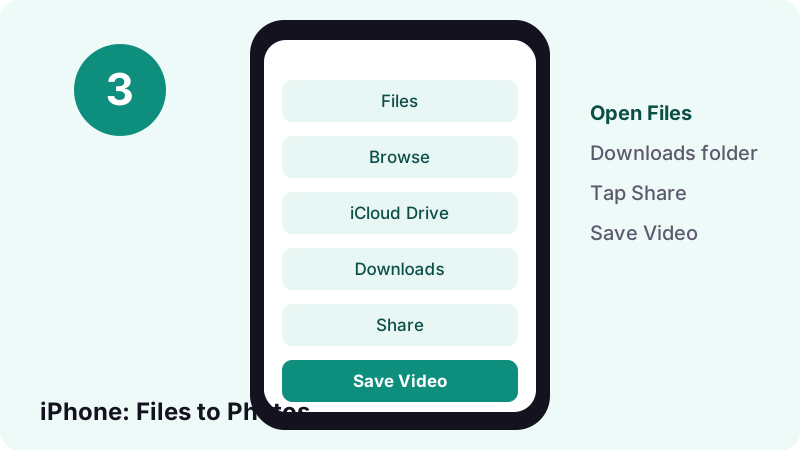
Safari puts the MP4 in the Files app, inside Downloads. Open it there, tap the Share button and choose Save Video, and the clip joins your Photos library like any other camera roll item.
- Open the Files app and tap Browse.
- Tap Downloads (inside iCloud Drive on many iPhones).
- Tap the MP4 to open it.
- Tap Share, then Save Video.
“Tip: If you don’t see the Downloads folder on the Browse screen, tap iCloud Drive.”
Can you check a download that is still in progress?
Yes. Apple's iPhone User Guide notes that Safari has a Downloads button you can tap to see the status of a file that is still coming in, or to reach recent downloads quickly. That is handy when a large HD file seems to be taking a while.
Prefer one-tap saving on iPhone in future? Our HD downloader page covers which file is best for Photos, and the format table further down explains HEVC.
Does the same work on iPad?
Yes. Apple's support article on downloads covers iPhone and iPad together: open the Files app, tap Browse, tap iCloud Drive and then Downloads. Once the clip is there, the same Share and Save Video steps save TikTok to camera roll on an iPad too.
Where does the video go on Android?
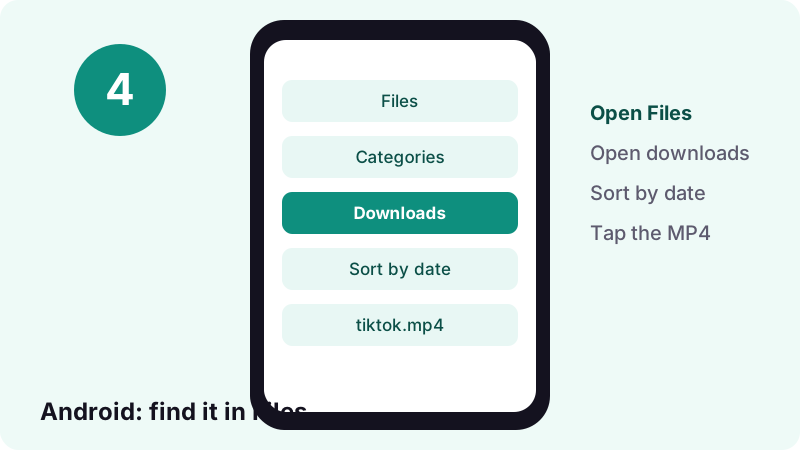
Chrome and most Android browsers save the MP4 to the Downloads folder. Open your Files app to find it, then play it from there or share it into the gallery app you use.
Google's Find & delete files on Android page says your files usually live in the Files app, and that some manufacturers ship a different app with another name. Inside, files are grouped by category and can be sorted by name, date or size.
- Open the Files app on your phone.
- Open the downloads category, or sort by date so the newest file is first.
- Tap the MP4 to play it and check it is the right clip.
- Touch and hold it, then tap Share if you want to send it on.
What if your phone has no app called Files?
Look for your manufacturer's file manager, often called My Files or File Manager. The steps are the same: open the downloads area, sort by date, tap the newest MP4.
Can you move a saved TikTok from Android to a computer?
Yes. Google's Android Help explains that with a USB cable you can tap the charging notification, choose File Transfer, and drag files across on Windows or a Chromebook. On the computer, look in the phone's Downloads folder for the MP4 you fetched.
How do you save your own drafts to your camera roll?
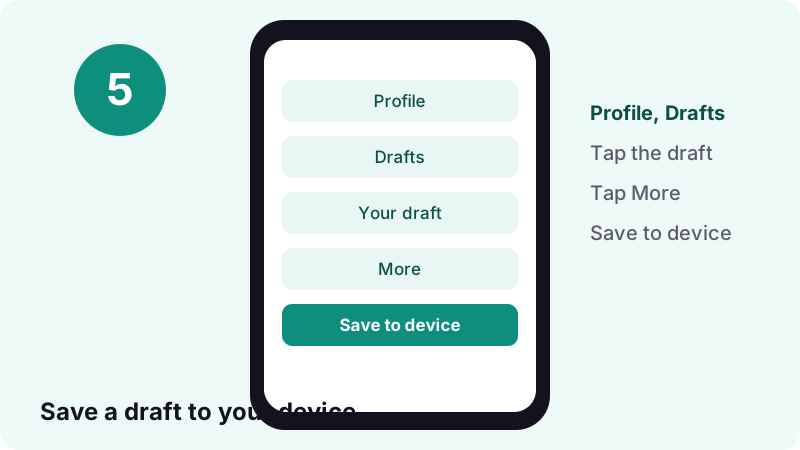
Go to Profile, open Drafts, tap the draft, tap More and choose Save to device. TikTok saves it to your gallery without a watermark by default, and you no longer need to post a draft to keep a copy.
- In the TikTok app, tap Profile at the bottom.
- Tap Drafts.
- Tap the draft you want to keep.
- Tap the More button at the top.
- Select Save to device.
“The draft video will be saved to your gallery with no watermark by default (you can turn on the watermark in your draft settings before saving).”
Why should you back up drafts at all?
TikTok's Help Center lists two reasons drafts can disappear: uninstalling and reinstalling the app, and moving the account to another device. Drafts also cannot be moved between accounts. A copy in your camera roll survives all three.
Can you save a post automatically before it goes live?
Yes. On the Post screen, tap More options and turn on Save to device. TikTok's Download content article recommends doing this so you always have an offline copy of what you publish.
Tiktokio.tech cannot open drafts. Drafts live only in your account, so TikTok's own Save to device is the only way to keep them.
Can you save your own posted videos to camera roll?
Yes. TikTok says every video you posted as public or unlisted can be saved with the same Share or press-and-hold methods. The saved copy may carry the watermark and your username.
If you need a clean copy of a public post you already published, paste its link into Tiktokio.tech. For future posts, turning on Save to device before you hit Post avoids the issue entirely.
What if Save video is missing on your own post?
Your download setting is probably off. Go to Profile, tap the menu button, open Settings and privacy, then Privacy, then Downloads, and switch on video downloads. Remember this also lets other people save your posts.
How do you save TikTok photo posts and slideshows?
In TikTok, open the photo post, tap Share, then Save photo, choose Select all or pick single images, and tap Save. If the option is missing, the creator does not allow it, exactly as with videos.
Want every image as a separate file without the app? The TikTok photo downloader pulls each picture of a public slideshow in one go. If you are making your own carousel instead, see our guide on how to make a slideshow on TikTok.
Do photos go to the same album as videos?
They go to your normal photo library, next to your own pictures. If you save many slideshows, an album just for TikTok keeps them easy to find later.
Can you save only the sound from a TikTok?
Yes, with a web tool. TikTok's Save video always gives you the full clip, but the TikTok MP3 downloader extracts the audio as its own small file.
Audio files are tiny: a 15-second sound comes to roughly 0.25 MB as M4A in our tests. Note that sound files go to Files or Downloads, not to the camera roll, because Photos and Gallery apps are built for pictures and video. If you plan to use a sound as a ringtone, our ringtone guide walks through it.
Can you turn a TikTok into a live photo or GIF?
Only when the creator allows downloads. TikTok's Manage video downloads page says that with downloads on, people can convert videos to live photos and GIFs; with downloads off, those options disappear too.
So the rule is simple: if Save video is missing, the live photo option will be missing as well. We have not tested every phone's wallpaper settings, so this guide does not promise a specific wallpaper flow.
Which file formats will you end up with?
Videos arrive as MP4. The standard file is usually H.264, while the HD copy is often H.265 (HEVC). Photos come as image files and sounds as M4A or MP3, each saved in a different place on your phone.
| What you save | File type | Lands in | Shows in camera roll? |
|---|---|---|---|
| Video via TikTok Save video | MP4 | Photos / Gallery | Yes, right away |
| Video via Tiktokio.tech | MP4 (H.264, or HEVC for many HD files) | Files > Downloads / Downloads | After you move it to Photos (iPhone) or open it from Files (Android) |
| Photo post images | Image files | Photos / Gallery | Yes |
| Sound only | M4A or MP3 | Files / Downloads | No, audio is not a camera roll item |
| Your own draft | Video file | Photos / Gallery | Yes |
Apple's HEIF and HEVC guide says HEVC offers better compression than H.264, so files use less storage at the same visual quality. That is why the HD file can be smaller than you expect.
Why won't the HD file play on some phones?
Usually because the HD copy is HEVC (H.265) and the device or app cannot decode it. Modern iPhones handle HEVC; Apple says iOS 11 or later is needed to fully view and edit this kind of media.
If an HD file shows a black screen or will not open, download the standard MP4 instead. It is more widely compatible. You lose a little sharpness, but the clip plays on almost anything, including older Android phones and some editing apps.
How can you tell which file you got?
Assume the file from the HD button is HEVC and the standard MP4 is the compatible one. If only the HD file misbehaves, that is the reason, and the standard file is the fix.
How do you fix storage problems when saving fails?
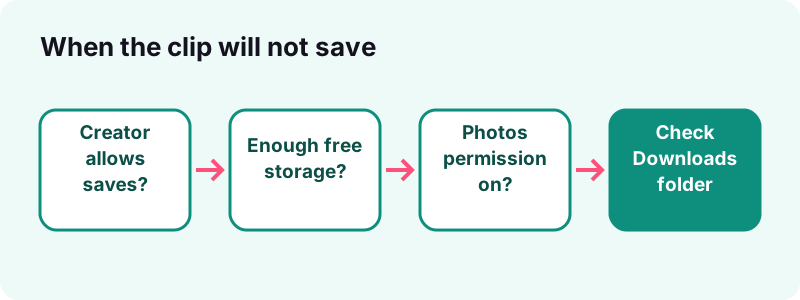
Check free space first. On iPhone, go to Settings, General, iPhone Storage; on Android, open Settings and tap Storage. TikTok itself lists low storage as a common cause of a failed download.
Where do TikTok downloads count on iPhone storage?
Apple's storage guide says Safari downloads and files kept On My iPhone count under Apps, while photos and videos in the Photos app count under Photos. So a clip you saved twice, once in Files and once in Photos, takes space twice.
- Delete the copy in Files > Downloads once the clip is safely in Photos.
- Offload apps you rarely use from the iPhone Storage screen.
- In TikTok, go to Settings and privacy, then Free up space, and clear the cache.
How do you free space on Android?
Google's Free up storage page describes Settings, Storage, Free up space, where you can pick old photos, videos and apps to delete. Turning on Smart Storage clears backed-up photos and videos automatically when space runs low.
How do you fix photo library permission problems?
Give TikTok, or your browser, permission to add to your photos. On iPhone that lives in Settings, Privacy & Security, Photos; on Android, open Settings, Apps, pick the app, then Permissions.
What does TikTok recommend on iPhone?
TikTok's Help Center tells iOS users to make sure TikTok has permission to reach the photo library, by opening the device settings and going to TikTok, then Photos. Without that, Save video can appear to work but nothing lands in the camera roll.
Apple's app privacy guide explains that you can review or change access at any time under Settings, Privacy & Security, where each category lists the apps that asked for it.
Which permission matters on Android?
Google's app permissions page lists a permission called Photos and videos, which lets an app reach the media on your device. Set it to Allow for TikTok if saves keep failing.
What if the saved video does not appear in your gallery?
Look in the downloads folder and in a TikTok album first. TikTok's own troubleshooting points to those two places, and browser downloads always start in Files or Downloads rather than the camera roll.
- Used TikTok's button? Open Photos or Gallery and check Recents or a TikTok album.
- Used a browser? Check Files > Downloads on iPhone or the Downloads category on Android.
- Still nothing? Restart the app and the phone, which TikTok lists as its first fix for most problems.
- Download failed message? Switch between Wi-Fi and mobile data, then try again.
If a browser download fails halfway, copy a fresh link and paste it again. Our links stay valid for one hour, so an old tab left open overnight will not work the next morning.
Why does the same clip appear twice?
Because you saved it twice: once with TikTok's button and once through the browser, or once in Files and again in Photos. Keep the copy you prefer and delete the other, so you do not pay for the same video twice in storage.
How do you control whether others can save your TikToks?
Change the Video downloads setting in Settings and privacy, Privacy, Downloads. Turning it off removes the Save video button from your posts for everyone else, both old and new.
- In TikTok, tap Profile.
- Tap the Menu button at the top.
- Tap Settings and privacy.
- Tap Privacy, then Downloads.
- Switch Video downloads on or off.
TikTok's Manage video downloads page adds a caveat worth knowing: even with downloads off, people can still share your post as a link or in direct messages. Setting a post to private is the only way to stop others from viewing it.
Is it legal to save TikTok videos to your phone?
Saving your own content, or content the creator lets you download, is the clear case. Whenever you save TikTok to camera roll, check who owns the clip first. Re-uploading someone else's clip or using it commercially without permission can infringe copyright, depending on where you live.
In the United States, fair use is a limited exception decided case by case. The U.S. Copyright Office Fair Use Index collects court decisions so people can see which uses courts found fair and which they did not. It is not a blanket permission.
- Keep clips for personal, offline viewing.
- Ask the creator before you repost, and credit them.
- Do not strip a watermark to pass off a video as yours.
Can you repost a clip you saved?
Only with care. A saved file is a private copy for watching later. Posting it again on another platform, without the creator's permission, takes their work out of the context they chose. Ask first, tag the original account and link back to the source post.
Tiktokio.tech is an independent tool and is not affiliated with TikTok or ByteDance. This is not legal advice. Rights holders can contact us through our DMCA page.
How do you keep your saved TikToks organised and backed up?
Put saved clips in their own album, then let iCloud Photos or Google Photos back them up. That way a lost or reset phone does not take your collection with it.
Does iCloud Photos keep TikTok videos in full quality?
Apple's iCloud Photos page says items are stored in their original formats at full resolution, and lists both HEVC and MP4 among them. So an HD TikTok clip in your library is backed up as is.
Will Google Photos accept the files?
Yes. Google Photos' backup help page lists .mp4 among supported video types and accepts videos up to 10 GB, far larger than any TikTok clip. Backup needs a good connection and space in your Google Account.
- Make an album called TikTok so saves do not get lost among camera shots.
- Delete the Files or Downloads copy once the clip is in your library.
- Back up drafts the day you make them, not when you are about to switch phones.
How often should you clean up?
Once a month is plenty for most people. Scroll the TikTok album, delete clips you no longer watch, and remove leftover copies in Files or Downloads that you already moved into your library. Small habits keep your phone from filling up with old videos you forgot you saved.
How big is TikTok, and why do so many people save clips?
TikTok reported reaching 1 billion users in September 2021, according to Wikipedia's TikTok article. With that much content, saving favourites to watch offline, on a plane or with weak signal, is one of the most common things people ask how to do.
Stories are a separate case: public ones can be saved with the TikTok story downloader while they are still up, using the same paste-and-download steps as a normal video.
The practical takeaway: start with TikTok's button, fall back to Tiktokio.tech when the button is missing or you want a clean file, and use Save to device for your own drafts. Those three moves cover almost every way to save TikTok to camera roll.
Frequently asked questions
How do I save TikTok to camera roll?
Open the video, tap Share and tap Save video. TikTok puts it in Photos or Gallery. If the button is missing, copy the link and use Tiktokio.tech, then move the MP4 from Downloads to your photo library.
Why can't I save TikTok to camera roll?
Most often the creator has turned downloads off, so the Save video option is hidden. Other causes are low storage, no photo library permission for TikTok, or a private or deleted post.
How do I save a TikTok without the watermark?
Save your own drafts with Save to device, which has no watermark by default. For public posts, paste the link into Tiktokio.tech and pick the MP4 without watermark.
Where do TikTok videos go when I save them?
TikTok's Save video sends them to your gallery. Browser downloads go to Files, Downloads on iPhone, or the Downloads folder on Android, until you move them.
Can I save someone else's TikTok if they turned downloads off?
Not through TikTok, because the button is hidden. A web tool can only fetch what TikTok serves for a public post. Respect the creator's choice and ask before reusing their work.
Can I save TikTok drafts to my phone?
Yes. Go to Profile, Drafts, tap the draft, tap More and choose Save to device. You do not have to post it first.
Why does my saved HD TikTok not play?
The HD file is often HEVC (H.265). Older phones and some apps cannot play it. Download the standard MP4 instead, which works almost everywhere.
Does saving a TikTok notify the creator?
TikTok's Help Center pages we read do not describe any notification for a saved video, so we cannot confirm one either way. Tiktokio.tech does not log in to TikTok and sends nothing to the creator.
Can I save TikTok photo slideshows to camera roll?
Yes. Tap Share, then Save photo, choose Select all and tap Save. Or use the Tiktokio.tech photo downloader to get every image of a public post.
Is Tiktokio.tech free, and do I need an account?
It is free, needs no account and no app, and works in any browser. Download links expire after one hour and nothing is stored.
Video
TikTok Downloader for MP4, HD and Audio, Without the Watermark — Download TikTok videos as MP4 without the watermark.
Sources
- Download content — TikTok Help Center
- How to save TikTok videos to your device — TikTok Help Center
- Manage video downloads — TikTok Help Center
- Find your downloaded files on iPhone — Apple Support
- How to check the storage on your iPhone and iPad — Apple Support
- Using HEIF or HEVC media on Apple devices — Apple Support
- Find & delete files on Android — Android Help
- Change app permissions on your Android phone — Android Help
- TikTok — Wikipedia
- Fair Use Index — U.S. Copyright Office