How to download TikTok videos in HD in 3 steps
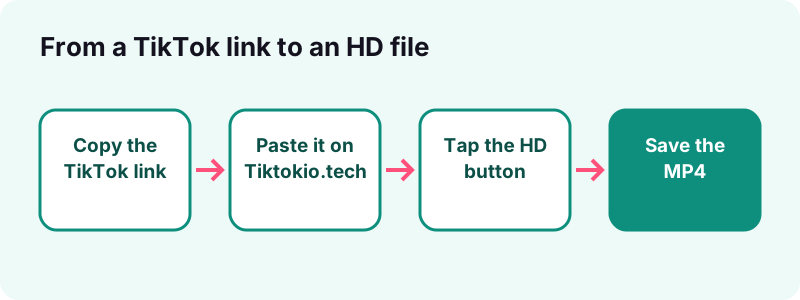
- Copy the TikTok link. In the TikTok app, open the post, tap Share, then Copy link. On a computer, copy the address from the browser bar.
- Paste it here. Paste the link into the box at the top of this page and tap Download. A public post usually resolves in 0.6 to 1.8 seconds.
- Pick the HD file. Tap the HD button when it appears and save the MP4. If there is no HD button, TikTok has no HD copy of that post, so take the standard MP4.
What does this TikTok HD downloader do?
This TikTok HD downloader asks TikTok which video files it stores for a public post and hands you the best one. If TikTok keeps an HD copy, you get that HD file as an MP4. If it does not, you get the normal MP4 without the watermark.
Nothing is re-encoded or upscaled on the way. The file comes straight from TikTok's own CDN, so the quality you save is exactly the quality TikTok serves. Download links expire after one hour and nothing is stored on our side.
Think of the TikTok HD downloader as a window onto TikTok's own file list for the post. It does not change the video; it only lets you pick the sharpest version TikTok already keeps, then save it on your phone or computer.
What you can save from one link
- The HD MP4, when TikTok has one for that post.
- The standard MP4 without the watermark.
- The sound as an audio file.
- The cover image, and every picture of a slideshow through the photo downloader.
Tiktokio.tech is an independent tool. It is not affiliated with tiktokio.com, TikTok or ByteDance. Pick another tool if you need a different file:
How do you download TikTok videos in HD?
To download TikTok videos in HD, copy the post's link, paste it on this page, then tap the HD button. The whole job takes three taps and works the same on iPhone, Android, Windows, Mac and Chromebook, in any modern browser. The TikTok HD downloader needs no extension or login.
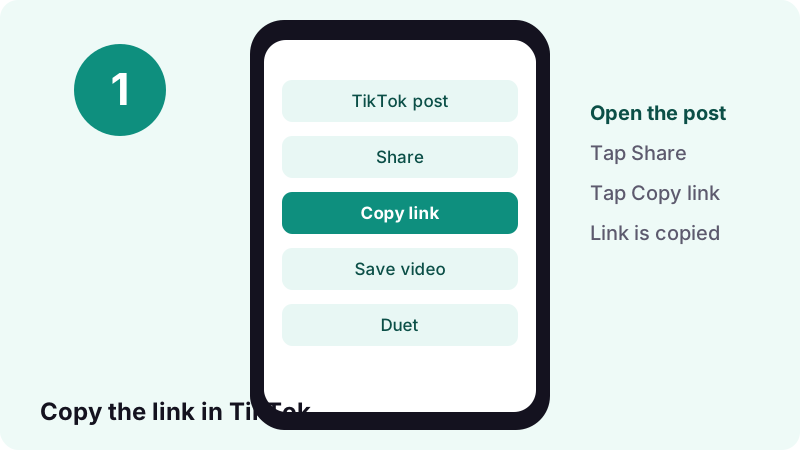
Step 1: copy the link of the post
In the TikTok app, open the video, tap the Share arrow and choose Copy link. On tiktok.com in a desktop browser, open the video and copy the address bar.
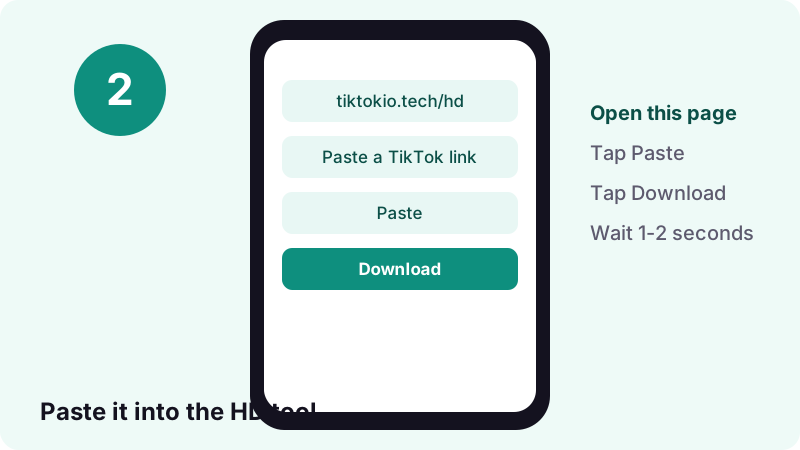
Step 2: paste the link and tap Download
Come back here, tap the box at the top and paste. The Paste button does it in one tap in most browsers. Tap Download; a public post normally resolves in 0.6 to 1.8 seconds.
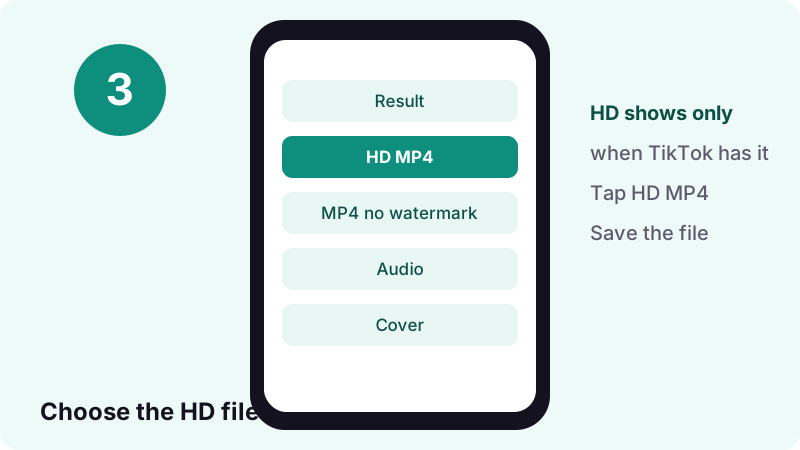
Step 3: pick the HD MP4 and save it
The result lists every file TikTok offers. Tap HD MP4 to save the high-quality copy. A small note tells you when that file uses H.265, so you know whether your player needs HEVC support.
- Copy the link in TikTok.
- Paste it on this page and tap Download.
- Tap HD MP4 (or the standard MP4 if HD is missing).
- Find the file in Downloads, or move it to your gallery with our camera roll guide.
What does "HD" really mean on TikTok?
On TikTok, "HD" means a second, higher-quality encode of the same post that TikTok keeps next to the everyday playback copy. It is not a filter or an upscale. Whether it exists, and how sharp it is, depends on what the creator uploaded and on TikTok's processing.
TikTok does not publish a list of the resolutions or bitrates it serves, so we will not invent one. What we can say from our own backend is that the HD file, when present, is often encoded in H.265 (HEVC), while the standard copy is the familiar H.264 MP4.
- HD is a separate encode stored by TikTok, not a setting you switch on.
- It exists only for some posts, depending on the upload.
- When it exists, the TikTok HD downloader shows an HD MP4 button next to the standard MP4.
Is HD the same as 1080p?
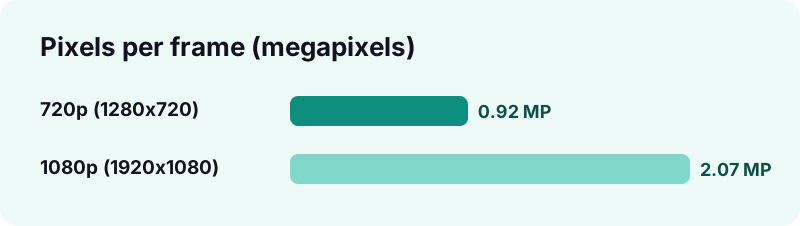
Not necessarily. "HD" is a family of formats. Wikipedia describes 720p as 1280×720 and 1080p, also called Full HD, as 1920×1080. TikTok videos are vertical, so the same numbers appear the other way round, for example 1080×1920.
| Name | Pixels (landscape) | Vertical version | Megapixels per frame |
|---|---|---|---|
| 720p (HD) | 1280×720 | 720×1280 | 0.92 |
| 1080p (Full HD) | 1920×1080 | 1080×1920 | 2.07 |
How can you check the resolution of the file you saved?
- Open the file's info or properties panel in your file manager or gallery app.
- Look for the frame width and height, for example 1080 × 1920.
- Compare the standard MP4 and the HD MP4 side by side: the HD one should list equal or larger numbers.
- Ignore the file name: "_hd" only tells you which button you tapped, not the pixel count.
H.264 vs H.265 (HEVC): which codec does the HD file use?
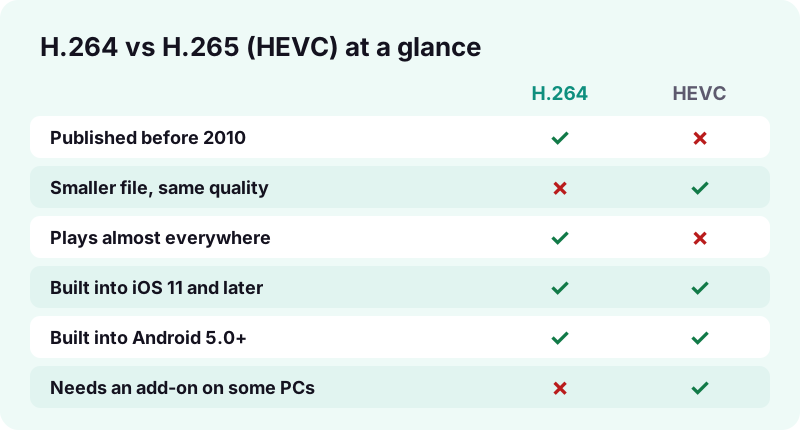
The HD copy is frequently H.265, also called HEVC, while the standard copy is H.264, also called AVC. Both live inside an ordinary .mp4 file. The codec decides how the picture is compressed, and therefore how big the file is and which devices can play it.
Wikipedia calls H.264 "by far the most commonly used format" for recording, compressing and distributing video, used by 79% of video industry developers as of December 2024. HEVC was published in 2013 as its successor.
Why would TikTok use HEVC for HD?
Because it squeezes the same picture into fewer bits. According to Wikipedia, HEVC achieves 25% to 50% better data compression than AVC at the same level of video quality. For short videos watched on mobile data, a smaller file at the same quality means faster starts and less data used.
| H.264 (AVC) | H.265 (HEVC) | |
|---|---|---|
| Also called | MPEG-4 Part 10 | MPEG-H Part 2 |
| Standard published | 2003 | 2013 |
| Compression vs AVC | Baseline | 25–50% better at the same quality |
| Typical role on TikTok | Standard playback MP4 | Often the HD MP4 |
| Compatibility | Nearly universal | Modern phones and PCs; some PCs need an add-on |
- Same container: both are saved as .mp4, so the extension tells you nothing about the codec.
- Same picture can look identical, while the HEVC file is smaller.
- Older or low-power devices may stutter on HEVC, especially at high resolution.
Why is the HD file sometimes smaller than the normal one?
Because file size follows bitrate and codec, not the "HD" label. An HEVC file can hold more detail in fewer megabytes than an H.264 file. So a smaller HD file is not a sign of a broken download; it is usually the more efficient codec doing its job.
Bitrate is the amount of data used per second of video. Two clips at the same resolution can differ a lot in size if one was encoded with more bits per second, or with a better codec.
- Smaller HD file + HEVC codec = normal.
- Smaller HD file + H.264 codec = the HD encode simply used a lower bitrate.
- Larger HD file = more data per second, usually more detail.
What decides how big a TikTok file is?
- Length: twice the duration means roughly twice the size at the same bitrate.
- Bitrate: more data per second keeps more detail and costs more space.
- Codec: HEVC needs fewer bits than H.264 for similar quality.
- Content: fast motion, confetti or grain need more data than a talking head on a plain wall.
Why do some TikTok posts have no HD copy?
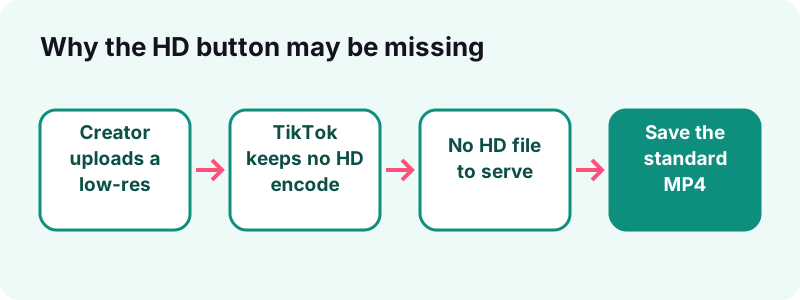
If the HD button does not appear, TikTok simply has no HD file for that post, or does not serve it to the public. A downloader cannot create quality that is not there: if TikTok does not serve the file, we cannot get it.
Common reasons the HD option is missing
- The creator uploaded a low-resolution or heavily compressed clip in the first place.
- The post is old and was processed before TikTok kept HD encodes for it.
- The post is a photo slideshow, which has images and a sound but no HD video.
- The creator turned off downloads, so TikTok withholds some files.
- The post is private, deleted, region-blocked or still a draft, which no public tool can open.
TikTok's own Help Center is clear that the creator controls downloads inside the app:
“If you don't have the option to save a video, this means the creator doesn't allow it.”
When HD is missing, the standard MP4 from our TikTok video downloader is the best copy available. Upscaling it later adds pixels, not real detail.
How do you play HEVC TikTok videos on Windows?
On Windows, an HEVC file plays once the HEVC Video Extensions are installed from the Microsoft Store. Wikipedia notes that Windows 11 version 22H2 and later include them by default, while Windows 10 removed built-in support in version 1709 and made it a separate, paid download.
“In many cases, you can add support by installing a codec extension from the Microsoft Store, such as the MPEG-2, HEVC, VP9, AV1, or Web Media video extensions.”
What to do if the HD file shows a black screen on a PC
- Check your Windows version under Settings, System, About.
- Open the Microsoft Store and search for HEVC Video Extensions.
- Install the extension, then reopen the MP4 in the Media Player app.
- Still nothing? Download the standard H.264 MP4 instead; it plays on practically every PC.
- Windows 11 22H2 or later: HEVC playback is included, per Wikipedia.
- Windows 10 1709 or later: add the HEVC Video Extensions from the Store.
- Any PC: the standard H.264 file from the no-watermark downloader needs nothing extra.
Microsoft also warns against random codec packs. Its Codecs FAQ recommends installing codecs only from trusted sources, such as the provider's own website or the Store.
How do you play HD TikTok files on iPhone, iPad and Mac?
Apple devices play HEVC natively from iOS 11 and macOS High Sierra 10.13 onward. Apple's support page lists HEVC, also known as H.265, as a format these systems support, and says it offers better compression than H.264 at the same visual quality.
“On some older devices, support for HEVC is affected by the resolution and frame rate (fps) of the video.”
Which Apple devices can record HEVC?
- iPhone 7 or iPhone 7 Plus or later.
- iPad (6th generation) or later, and iPad Air (3rd generation) or later.
- iPad mini (5th generation) or later.
- Apple Vision Pro.
Other Apple devices on iOS 11 or later can still view the files, with limitations. Apple adds that 1080p or lower at 60 fps or lower is more broadly compatible with older devices.
How do you turn an HEVC file into H.264 on a Mac?
Open the video in QuickTime Player, choose File, then Export As, and switch from Smaller File Size (HEVC) to Greater Compatibility (H.264), as described on Apple's HEVC page. Use this when you need to send the clip to an older device.
How do you play HEVC videos on Android?
Android has supported HEVC since Android 5.0, released in 2014, according to Wikipedia. Most phones in use today therefore play the HD file straight from the gallery or the Files app, with no extra app.
What if my Android phone still will not play it?
- Some devices decode only 8-bit HEVC (Main profile) in hardware, not 10-bit (Main 10), says Wikipedia.
- Try opening the file in a different video player app from the Play Store.
- Fall back to the standard H.264 MP4, which plays on any Android phone.
Which browsers can play HEVC?
| Browser | HEVC support since |
|---|---|
| Safari | Version 11, September 2017 |
| Chrome | Version 107, October 2022 (with supported hardware) |
| Edge | Version 77 on Windows with HEVC Video Extensions; version 107 on more platforms |
| Firefox for Android | Version 137, April 2025 |
How much space does HD video take?
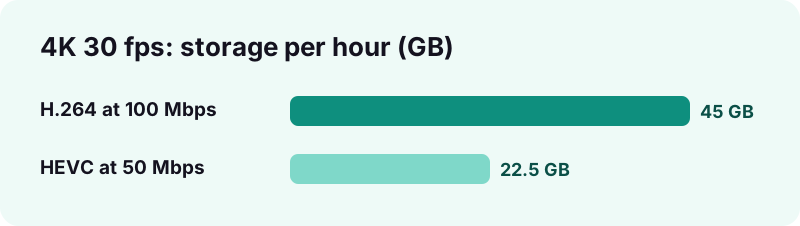
HD takes more space than standard video at the same codec, but HEVC cuts that cost roughly in half. Wikipedia gives a concrete example: 4K at 30 frames per second needs about 50 Mbps with HEVC versus 100 Mbps with older H.264 profiles.
| Example (from Wikipedia) | Bitrate | Per hour | Per minute (calculated) |
|---|---|---|---|
| 4K 30 fps, H.264 | 100 Mbps | 45 GB | ≈ 0.75 GB |
| 4K 30 fps, HEVC | 50 Mbps | 22.5 GB | ≈ 0.375 GB |
TikTok does not publish its bitrates, so treat this as a picture of the codec gap, not as the size of your file. A short TikTok in HD is typically a few megabytes; the exact number depends on length, motion and the creator's upload.
How do you estimate a file's size yourself?
- Megabytes ≈ bitrate in Mbps × seconds ÷ 8.
- A 30-second clip at 2 Mbps ≈ 7.5 MB; at 4 Mbps ≈ 15 MB.
- Your file manager shows the real size the moment the download finishes.
HD, no-watermark and watermark copies: which one should you save?
Save HD when it exists and your device plays HEVC; save the standard no-watermark MP4 when you need maximum compatibility. The watermarked copy is only useful when you want TikTok's logo and the username visible in the frame.
| File | Watermark | Usual codec | Best for |
|---|---|---|---|
| HD MP4 | No | Often H.265 (HEVC) | Sharpest copy, editing, big screens |
| Standard MP4 | No | H.264 | Sharing to any device or app |
| Watermarked MP4 | Yes | H.264 | Re-sharing with visible credit |
| Audio only | — | AAC (M4A) or MP3 | Sounds, ringtones, notes |
- Editing your own clip on a modern phone or PC: take HD from the TikTok HD downloader.
- Sending to an older laptop or TV: take the standard MP4.
- Only need the music: open the TikTok MP3 page instead.
- Saving a slideshow: the photo tool gives you every image.
For the sound alone, use the TikTok MP3 tool. For a slideshow's images, the photo downloader saves each picture, and the story downloader handles public stories.
How do you keep HD quality when you edit or re-post?
Keep quality by editing the HD original and exporting once. Every lossy re-encode throws away a little more detail, so the fewer times a clip is compressed, the better it looks at the end.
Practical tips for your own clips
- Edit from the HD file, not from a screen recording.
- Export at the same resolution as the source; scaling up does not add detail.
- If your editor cannot import HEVC, convert once to H.264 and keep that as your working copy.
- Keep the original in a folder you back up, such as iCloud Photos or Google Photos.
- Back up your own stories too, with the TikTok story downloader, before they expire.
Only re-post clips that are yours or that you have permission to reuse, and credit the creator. The next section explains why.
Is it legal to download TikTok videos in HD?
Saving your own videos is fine; saving other people's videos is a question of copyright, and quality does not change the answer. An HD copy is the same work as the standard one, owned by the same creator. A TikTok HD downloader is a tool; how you use the file is your responsibility.
- Back up your own posts freely.
- Keep other people's clips for personal viewing, or ask the creator first.
- Do not re-upload someone else's video as your own or use it in ads.
- Respect a creator who has turned downloads off.
In the United States, the U.S. Copyright Office explains that fair use is judged case by case on four factors, including the purpose of the use and its effect on the market for the original.
What if the HD download does not work?
Most failures come from the post itself or from an expired link. Start by checking that the post opens in a private browser window without logging in; if it does not, no public tool can fetch it.
- Open the post in a private window to confirm it is public.
- Paste the link into the TikTok HD downloader again.
- Check the HEVC note under the HD button.
- Try the standard MP4 if your device cannot play HEVC.
- Use the story downloader if the link points to a story.
The HD file plays sound but no picture
Your player lacks HEVC support. Install the HEVC extension on Windows, update iOS or Android, or download the standard MP4 instead.
The download link says it has expired
Links last one hour. Paste the TikTok link again to get fresh ones.
The file went to a folder I cannot find
- iPhone and iPad: Files app, then the Downloads folder (see Apple's guide).
- Android: the Downloads folder or the Files app.
- Windows and Mac: your browser's Downloads folder.
Frequently asked questions
Is this TikTok HD downloader free?
Yes. There is no account, no app and no daily limit. You paste a link and save the files TikTok serves for that public post.
Why is there no HD button for my video?
TikTok has no HD copy of that post, or does not serve it publicly. If TikTok does not serve the file, we cannot get it. Save the standard MP4 instead.
Does the HD downloader upscale videos?
No. The file comes from TikTok's own CDN without re-encoding, so you get exactly the quality TikTok stores, never an artificial upscale.
What is H.265 or HEVC?
It is a video codec published in 2013 as the successor to H.264. Wikipedia says it compresses 25% to 50% better at the same quality, which is why HD files can be small.
Why won't the HD video play on my PC?
Your Windows setup may lack HEVC support. Install the HEVC Video Extensions from the Microsoft Store, or download the standard H.264 MP4, which plays everywhere.
Can I download TikTok videos in HD on iPhone?
Yes. Use Safari, paste the link and tap HD MP4. The file lands in Files, in Downloads. iOS 11 and later play HEVC natively.
Is the HD file free of the TikTok watermark?
Yes. The HD MP4 has no moving TikTok logo or username. A separate watermarked copy is offered only when you want it.
Can I save private or deleted TikToks in HD?
No. Only public posts work. Private, deleted, region-blocked posts and drafts cannot be opened by any public tool.
How long do the download links last?
One hour. After that, paste the TikTok link again. We do not store videos on our servers.
Is Tiktokio.tech affiliated with TikTok?
No. Tiktokio.tech is an independent tool and is not affiliated with tiktokio.com, TikTok or ByteDance.
Sources
- High Efficiency Video Coding — Wikipedia
- Advanced Video Coding — Wikipedia
- 1080p — Wikipedia
- 720p — Wikipedia
- Using HEIF or HEVC media on Apple devices — Apple Support
- Where to find downloads on your iPhone or iPad — Apple Support
- Codecs FAQ — Microsoft Support
- Download content — TikTok Help Center
- Fair Use Index — U.S. Copyright Office