How to save a TikTok sound as audio in 3 steps
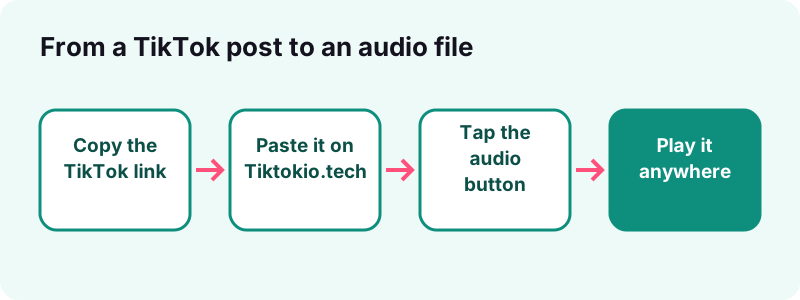
- Copy the link. Open the TikTok post (or the sound's page) in the app, tap Share, then Copy link.
- Paste it here. Paste the link into the box at the top of this page and tap Download. Public posts usually resolve in 0.6 to 1.8 seconds.
- Save the audio. Tap Download MP3 / audio. The file is named .m4a when TikTok stores AAC, or .mp3 when it stores MP3.
What is the TikTok MP3 tool?
The TikTok MP3 tool on Tiktokio.tech saves the sound of a public TikTok as a separate audio file. You paste a link, it asks TikTok for the audio track of that post, and you download it in the format TikTok stores, with no video attached.
It works in any browser on iPhone, Android, Windows, Mac or Chromebook. There is no account, no app and no limit. Files come straight from TikTok's own CDN, links expire after one hour, and nothing is kept on our servers.
What people use a TikTok sound file for
- Keeping the audio of a voice-over or song you recorded.
- Listening to a lecture clip, recipe or language lesson without the screen on.
- Making a ringtone from your own sound (see our ringtone guide).
- Studying a trend before you film your own take on it.
Tiktokio.tech is an independent tool and is not affiliated with tiktokio.com, TikTok or ByteDance. Need the picture too? Pick another tool:
How do you download a TikTok sound as audio?
Copy the post's link, paste it on this page and tap the audio button. That is the whole TikTok to MP3 job: three taps, no converter app, no upload of your own files.
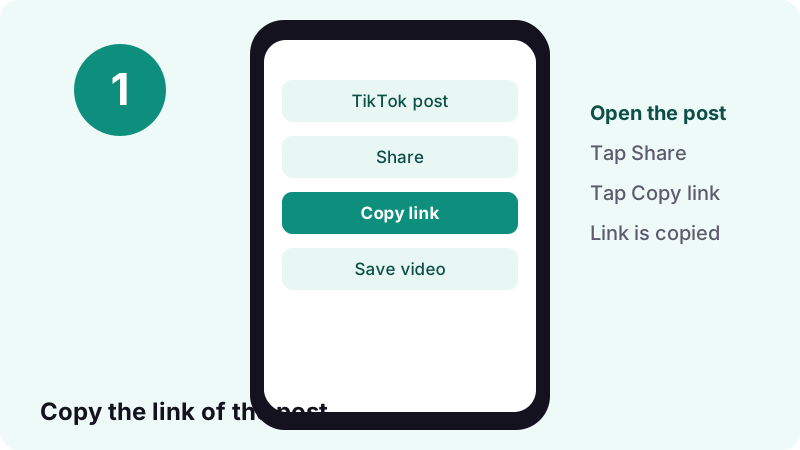
Step 1: copy the link in TikTok
Open the post, tap the Share arrow and choose Copy link. On a computer, open the post on tiktok.com and copy the address bar.
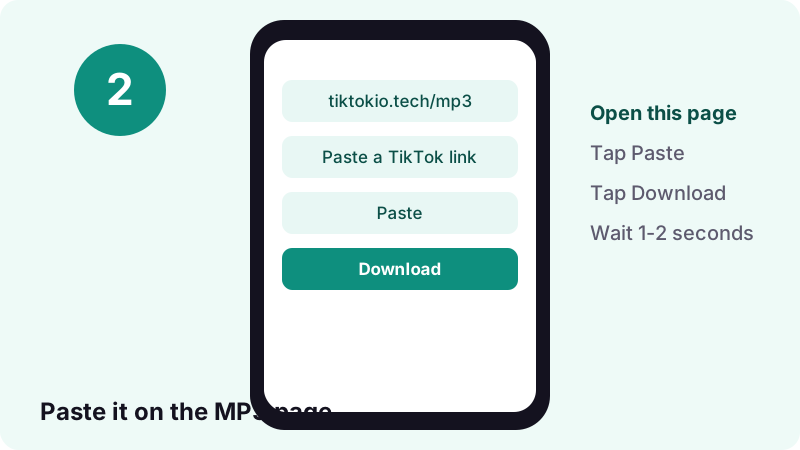
Step 2: paste it and tap Download
Tap the box at the top of this page, then the Paste button, then Download. A public post normally resolves in 0.6 to 1.8 seconds.
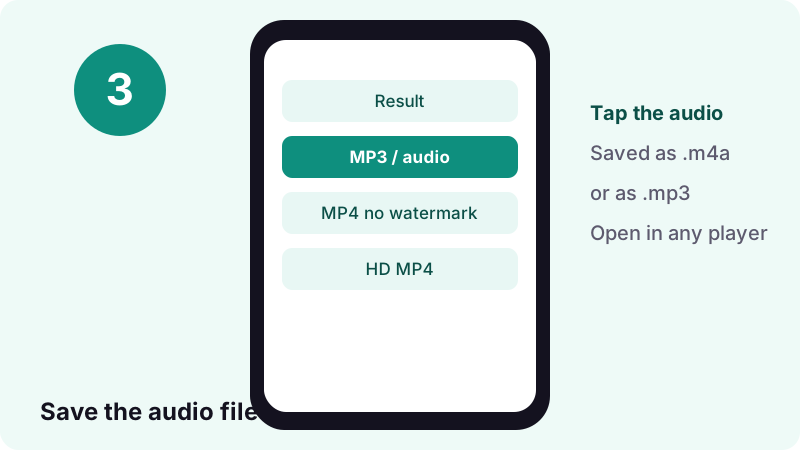
Step 3: save the audio
Tap Download MP3 / audio. The file goes to your Downloads folder. On iPhone and iPad, Safari puts it in the Files app, in Downloads, as Apple explains.
- Copy the TikTok link.
- Paste it here and tap Download.
- Tap the audio option.
- Open the file in your music or files app.
What format is a TikTok sound really?
Most TikTok sounds are stored as AAC audio inside an MP4-family file, which is what an .m4a file is. Some are stored as real MP3. Our TikTok MP3 tool hands you whichever one TikTok serves and names it honestly.
Here is how it works under the hood: the audio is first offered as an .mp3 download. If TikTok's server reports that the file is actually MP4 audio, we rename it to .m4a so your player opens it correctly. We never re-encode, so no quality is lost.
Why not convert everything to MP3?
- Converting AAC to MP3 means decoding and compressing again, which can only lose detail.
- Every common phone and computer already plays M4A.
- A converted file would no longer be the original; it would be a copy of a copy.
Wikipedia notes that audio-only MPEG-4 files generally use the .m4a extension. So an M4A from a TikTok is not a strange format; it is the same family as the songs sold on the iTunes Store.
MP3 vs M4A (AAC): which one is better?
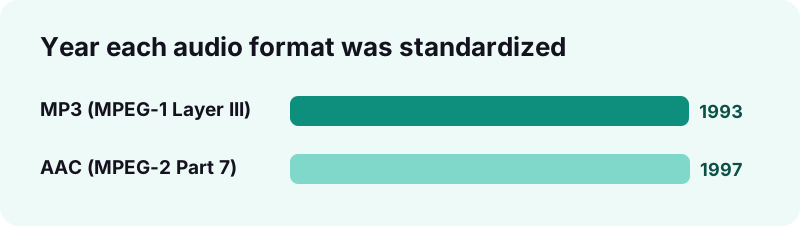
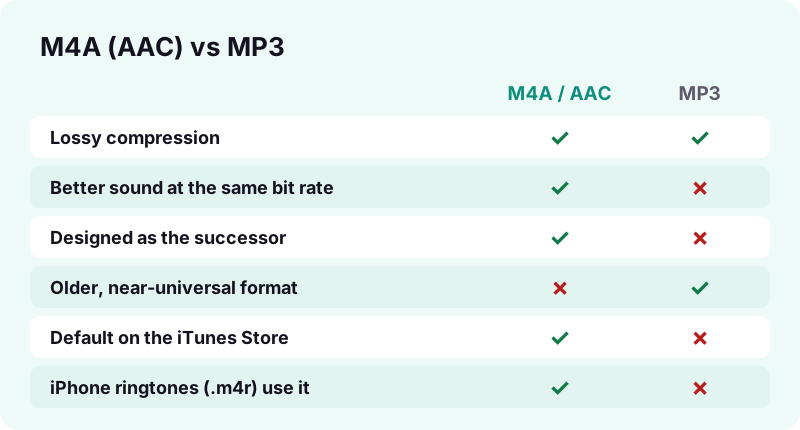
At the same bit rate, AAC usually sounds better than MP3; MP3 wins only on age and universal support. Both are lossy formats, meaning they drop sound detail that the ear is unlikely to notice, to keep files small.
“AAC was designed to be the successor of the MP3 format (MPEG-2 Audio Layer III) and generally achieves higher sound quality than MP3 at the same bit rate”
| MP3 | AAC (in .m4a) | |
|---|---|---|
| Standard | MPEG-1 Audio Layer III | MPEG-2 Part 7 / MPEG-4 Part 3 |
| Published | 1993 (ISO/IEC 11172-3) | 1997 (ISO/IEC 13818-7) |
| Compression | Lossy | Lossy |
| Quality at the same bit rate | Good | Generally higher |
| Where it is the default | Countless older players | iTunes Store, iPhone ringtones (.m4r) |
| Plays on iPhone and Android | Yes | Yes |
When should you still choose MP3?
- An old car stereo or MP3 player that refuses M4A.
- A website or app that only accepts .mp3 uploads.
- A video editor that will not import AAC (rare today).
In those cases, convert once with a trusted audio editor and keep the original M4A as your master copy.
TikTok MP3 tool vs other ways to get a sound
A TikTok MP3 download gives you the original audio stream; the alternatives either add the video or re-record the sound. Recording your screen captures the audio a second time through your device, so it is never cleaner than the file TikTok serves.
| Method | What you get | Audio quality | Watermark |
|---|---|---|---|
| TikTok MP3 tool on Tiktokio.tech | Audio file only (M4A or MP3) | Original stream, no re-encode | None (audio has no logo) |
| TikTok's Save video button | Full video | Original audio inside a video | Yes, logo and username |
| Screen recording | Video of your screen | Re-recorded, may include system sounds | Whatever is on screen |
When is the in-app save enough?
- When you want the video and the sound together.
- When the creator has allowed downloads.
- When a watermark does not bother you.
When is the TikTok MP3 route better?
- You only need audio for a playlist, a ringtone or a voice note.
- You want a small file instead of a video several times larger.
- You want the original audio without the TikTok logo or end screen.
Does converting TikTok audio to MP3 improve the sound?
No. Converting a sound from M4A to MP3 cannot add back detail that was removed when TikTok compressed it. At best the result sounds the same; at worst it picks up a second round of compression artifacts.
Wikipedia describes MP3 as lossy compression that partially discards data to shrink files. Running lossy audio through a second lossy encoder stacks those losses. That is why our TikTok MP3 downloads keep the original stream.
Signs a file was converted badly
- A swishy, watery sound on cymbals and "s" sounds.
- A file size much larger than the original with no audible gain.
- Silence or clicks added at the start or end.
How big is a TikTok sound file?
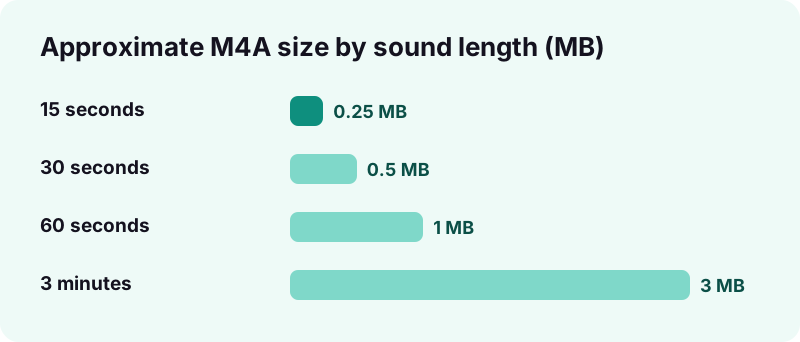
Small. In our own tests, a 15-second TikTok sound came out at about 0.25 MB as an M4A. Scaling that by length gives a quick estimate for longer sounds; actual sizes vary with each sound's bit rate. An audio file is therefore far smaller than the video it came from.
| Sound length | Approximate M4A size | How we got it |
|---|---|---|
| 15 seconds | ≈ 0.25 MB | Measured |
| 30 seconds | ≈ 0.5 MB | Estimated (×2) |
| 60 seconds | ≈ 1 MB | Estimated (×4) |
| 3 minutes | ≈ 3 MB | Estimated (×12) |
- A whole album of TikTok sounds fits in a few hundred megabytes.
- Downloading over mobile data costs very little.
- Your phone's storage is not a reason to convert to MP3.
Which devices play TikTok MP3 and M4A files?
Practically all of them. Wikipedia lists AAC support on iPhone, iPod, Android and many other devices, and Microsoft says Windows Media Player includes popular codecs like MP3. Plain MP3 remains the safest pick for very old players.
| Device | MP3 | M4A (AAC) | Where the file lands |
|---|---|---|---|
| iPhone / iPad | Yes | Yes | Files app → Downloads |
| Android | Yes | Yes | Downloads folder |
| Windows PC | Yes (Windows Media Player) | Depends on installed codecs | Browser Downloads folder |
What if Windows will not open the M4A?
Microsoft's Codecs FAQ suggests getting missing codecs from the Microsoft Store or the codec provider, and warns against unknown codec packs.
What can you do with a TikTok MP3 file?
A saved sound works like any other audio file: play it, trim it, set it as an alert or drop it into an edit of your own video. What you may do with it depends on who owns the music, so the ideas below assume the sound is yours or licensed.
- Add your TikTok MP3 to a playlist in your phone's music or files app.
- Trim a few seconds for a ringtone or notification sound.
- Import it into a video editor to re-cut your own clip.
- Keep your voice-overs as an audio archive outside TikTok.
What a TikTok MP3 download does not include
- No lyrics, cover art or song credits are embedded by us.
- No video track; use the video downloader for that.
- No rights to the music: the licence stays with the rights holders.
If you also want the clip in the best quality TikTok stores, run the same link through the HD downloader; one paste per tool is enough.
Can you use a TikTok sound as a ringtone?
Yes, if it is a sound you made or have permission to use. On iPhone, ringtones are MPEG-4 audio with an .m4r extension, according to Wikipedia, so a little extra work is needed. Android steps differ by phone maker; the guide below covers both.
- Trim the sound to the part you want; short is better for a ringtone.
- Keep the original file before you edit.
- Follow the step-by-step TikTok sound as ringtone guide for iPhone and Android.
How do you find the TikTok sound you want?
Start from the post that uses the sound, or from the sound's own page, and copy that link. Either one works with the TikTok MP3 page, as long as the post is public.
Original sound or library sound?
TikTok's Music Terms separate library music, which TikTok calls Sounds, from "Original Sounds" that users upload from their own device. An original sound may be someone's voice or their own music; a library sound is licensed music.
Where trending sounds show up
- In the post that made you notice the sound in the first place.
- In posts by creators you follow, when several of them use the same audio.
- In our guide on how to find trending sounds on TikTok.
Who owns the music in a TikTok sound?
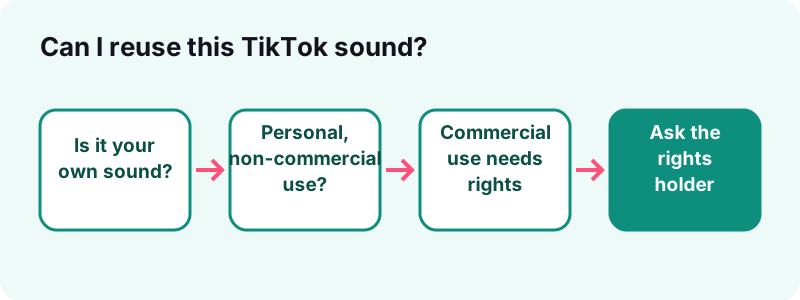
The song's rights holders do, not TikTok and not the person who used it. TikTok licenses music for use inside its app, and its terms limit what users may do with it.
“Sounds are made available to individual users to include in their videos, so long as the videos are only for personal entertainment and non-commercial purposes.”
What the Commercial Music Library changes
For brands, TikTok offers Commercial Sounds. Its Commercial Music Library terms say commercial uses outside TikTok are not permitted and need separate licensing from the rights holders.
- Personal listening of a saved sound: low risk, but the music is still not yours.
- Re-using a song in a business video, ad or podcast: needs a licence.
- Uploading the song elsewhere as your own: not allowed.
- Your own voice-over or original music: yours to keep.
Is downloading TikTok music legal?
Saving your own sounds is fine; saving and reusing other people's music depends on copyright law and on what you do with the file. A TikTok MP3 download does not give you any rights to the song inside it.
“Fair use is a legal doctrine that promotes freedom of expression by permitting the unlicensed use of copyright-protected works in certain circumstances.”
The four fair use factors
- Purpose and character of the use, including whether it is commercial.
- Nature of the copyrighted work; a song is a creative work.
- Amount and substantiality of the portion used.
- Effect of the use on the market for the original.
The Office notes that using a creative work such as a song is less likely to support fair use than using a factual one. When in doubt, ask the rights holder or use music you have licensed.
Why can't I get the audio from some TikToks?
Because TikTok does not serve it publicly for that post. If TikTok does not serve the file, we cannot get it, and no honest tool can.
- The post is private, deleted, region-blocked or a draft.
- The creator turned off downloads; TikTok's Help Center says that if the save option is missing, "the creator doesn't allow it".
- The link is to a profile or a search page instead of a single post.
Try the link of another public post that uses the same sound. For the full video instead, use the TikTok video downloader or the HD downloader.
Tips for a tidy TikTok sound collection
Name, sort and back up your files the day you save them; a folder of "tiktokio_123.m4a" files gets confusing fast.
Simple habits that help
- Rename each file with the sound name and the creator.
- Keep sounds you made in a separate folder from music you saved.
- Back up your own originals to iCloud Drive, Google Drive or a computer.
- Save the matching video with the TikTok HD downloader if you may want the visuals later.
- Slideshow posts carry a sound too; grab the pictures with the photo downloader.
Saving a sound from a story
Public stories disappear after a while. Use the story downloader to keep the clip, then the TikTok MP3 tool to pull the sound from a regular post if you need audio only.
Frequently asked questions
Is the TikTok MP3 tool free?
Yes. No account, no app and no limit. Paste the link of a public TikTok and save the audio TikTok serves for it.
Why did I get an .m4a file instead of .mp3?
Because TikTok stores that sound as AAC audio in an MP4 file. We name it .m4a so your player opens it correctly, and we do not re-encode it.
Is M4A worse than MP3?
No. Wikipedia notes that AAC, the codec inside M4A, generally sounds better than MP3 at the same bit rate. Both are lossy.
Can I convert TikTok to MP3 with better quality?
No. Converting cannot restore detail TikTok's compression removed. Keep the original file unless a device truly needs MP3.
How big is a TikTok sound file?
Small. In our tests a 15-second sound was about 0.25 MB as M4A. Longer sounds scale roughly with length.
Can I download a sound without the video?
Yes. The audio option gives you only the sound track. Use the video tools if you also want the picture.
Can I use a downloaded TikTok sound in my own videos or ads?
Only with the rights. TikTok's Music Terms limit library Sounds to personal, non-commercial use; commercial use needs a licence from the rights holders.
Why does the audio button not appear?
TikTok does not serve the audio for that post publicly, for example when it is private, deleted, region-blocked or the creator blocked downloads.
Does it work on iPhone?
Yes. In Safari, paste the link and tap the audio option. The file is saved in the Files app, in Downloads.
Is Tiktokio.tech part of TikTok?
No. Tiktokio.tech is an independent tool and is not affiliated with tiktokio.com, TikTok or ByteDance.
Guides
Sources
- MP3 — Wikipedia
- Advanced Audio Coding — Wikipedia
- MP4 file format — Wikipedia
- Music Terms of Service — TikTok
- Commercial Music Library User Terms — TikTok
- Download content — TikTok Help Center
- Fair Use Index — U.S. Copyright Office
- Codecs FAQ — Microsoft Support
- Where to find downloads on your iPhone or iPad — Apple Support